TwinCAT Startup File
Generating a TwinCAT startup file stores the existing parameter configuration of a drive into xml format. This startup file can be used in applications which require specific static configuration written by a master in the initialization phase of the system.
-
-
Only parameters that are stored in non volatile memory are written. These parameters can be checked using the DRV.NVLIST command.
Generating File
To generate a TwinCAT startup file, select Tools from the WorkBench tool bar. Find the drive with the configuration you want to save, and select Export To File -> TwinCAT startup.
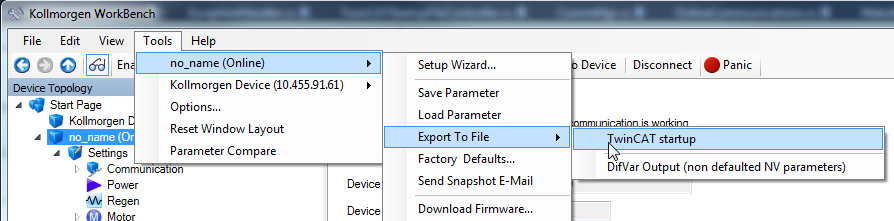
This will load the TwinCAT startup view which can be used to configure the conditions of the generated file:
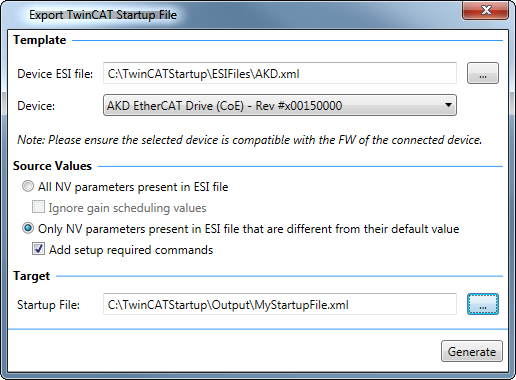
Source Values
Select between exporting all NV parameters present in the ESI file or only the NV parameters that are different from their default value. Selecting Add setup required commands will force mandatory keywords (keywords that may cause the drive to fault if not set properly) to be exported as well.
Integration in TwinCAT
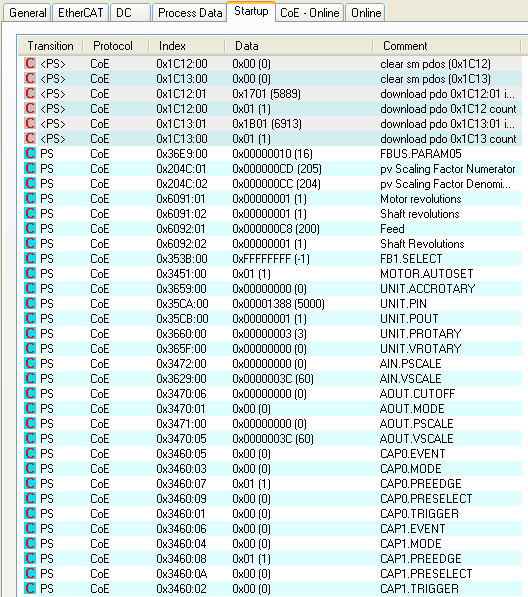
Using the Startup tab in TwinCAT, right-click on the window and select Import from Xml... and select the generated file.