








Profile Position Mode
| Axis | Object | Value |
|---|---|---|
| Axis 1 | 6060h ((see "6060h, 6860h Modes of operation - AxisX")) | 1 |
| Axis 2 | 6860h ((see "6060h, 6860h Modes of operation - AxisX")) | 1 |
Fieldbus
Profile Position Mode is supported by the following fieldbuses:
- CAN bus/CANopen
- EtherCAT/CANopen over EtherCAT (CoE)
Description
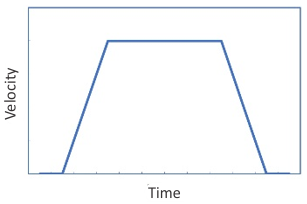
Profile Position Mode is a CANopen (DS402) mode of operation used for point to point moves. The CANopen objects define the motion profile like a motion task saved in the drive. However, the profile is not contained in any of the drive’s motion tasks.
Drive Opmode and Command Source
The AKD2G opmode and command source are automatically configured when the mode of operation is set through objects 6060h, 6860h Modes of operation - AxisX.
| Drive Command | Value |
|---|---|
| AXIS#.OPMODE | 2 - Position |
| AXIS#.CMDSOURCE | 1 - Fieldbus |
Motion Settings:
- Absolute or relative
- Target position or distance
- Profile velocity
- Profile acceleration
- Profile deceleration
- Scaling
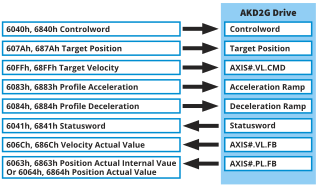
Common PDO Data
| Index | Sub-index | Object Name | Drive Command | Data Type | Access |
|---|---|---|---|---|---|
| 607Ah, 687Ah Target position - AxisX | 0h | Target position | AXIS#.FBUS.P | Signed32 | Read/Write |
| 6081h, 6881h Profile velocity in pp-mode - AxisX | 0h | Profile velocity | AXIS#.FBUS.V | Unsigned32 | Read/Write |
| 6083h, 6883h Profile acceleration - AxisX | 0h | Profile acceleration | AXIS#.FBUS.ACC | Unsigned32 | Read/Write |
| 6084h, 6884h Profile deceleration - AxisX | 0h | Profile deceleration | AXIS#.FBUS.DEC | Unsigned32 | Read/Write |
| 6040h, 6840h Controlword - AxisX | 0h | Controlword | Unsigned16 | Read/Write |
| Index | Sub-index | Object Name | Drive Command | Data Type | Access |
|---|---|---|---|---|---|
| 6041h, 6841h Statusword - AxisX | 0h | Statusword | AXIS#.CANOPEN.STATUSWORD | Unsigned16 | Read Only |
| 6063h, 6863h Position actual internal value - AxisX | 0h | Position actual internal value | AXIS#.PL.FB | Signed32 | Read Only |
| 6064h, 6864h Position actual value - AxisX | 0h | Position actual value | AXIS#.PL.FB | Signed32 | Read Only |
| 606Ch, 686Ch Velocity actual value - AxisX | 0h | Velocity actual value | AXIS#.VL.FB | Signed32 | Read Only |
| 605Ah, 685Ah Quick stop option code - AxisX | 0h | Quick stop option code | N/A | Signed16 | Read/Write |
| 5000h, 5100h AXIS#.* | 4h | Axis specific objects | AXIS#.MOTIONSTAT | Unsigned32 | Read Only |
Motion Functionality
Profile Position Mode follows the CANopen (DS402) State Machine. The drive must be in Operation enable state prior to issuing a start motion command. The profile can be defined while in other states.
The Controlword is used to control the state machine and command motion. See objects 6040h, 6840h Controlword - AxisX and 6041h, 6841h Statusword - AxisX.
| Controlword Bits | Motion Function |
|---|---|
| Bit 2 | Stop motion (Quick stop) |
| Bit 4 | Starts the move |
| Bit 5 | Starts from standstill or starts immediately |
| Bit 6 | Absolute or relative move type |
| Bit 8 | Pause/halt |
| Bit 9 | Starts from standstill or blend / on the fly move |
Controlword Bit 2 (Quick Stop):
- Defined by object 605Ah, 685Ah Quick stop option code - AxisX where the deceleration ramp is defined by object 6084h, 6884h Profile deceleration - AxisX or AXIS#.CS.DEC depending on the value of the Quick stop option code
- Sets velocity command = 0 (AXIS#.VL.CMD = 0)
- Does not remember previous setpoint
- To resume from Quick stop, step through the state machine
| Controlword Bit | Value | Function |
|---|---|---|
| Bit 2 | 0 | Stops motion |
| Bit 2 | 1 | Allows motion |
Controlword Bit 4:
- Starts the move
- Uses the current profile settings when bit 4 is set
- Edge triggered, active high (toggle off and on again to start the next move)
- Can be taken low during the move without stopping the move
| Controlword Bit | Value | Function |
|---|---|---|
| Bit 4 | 0 |
Reset this bit before triggering the next move or restarting a move Does not stop motion |
| Bit 4 | 1 | Starts the move on rising edge |
Controlword Bit 5:
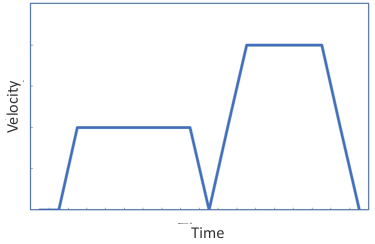
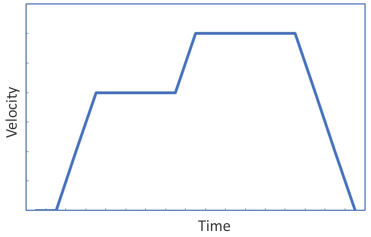
• Sets the behavior of how the profile move is started when bit 4 is set.
| Controlword Bit | Value | Function |
|---|---|---|
| Bit 5 | 0 |
Start after current move completion
|
| Bit 5 | 1 |
Start immediately |
| Bit 5 = 0 | Bit 5 = 1 |
|---|---|
|
|
Controlword Bit 6:
- Used to select between absolute and relative move types
- Absolute moves will move the motor to the target position regardless of the current position
- Relative moves will move the motor a specified distance
- Relative move direction is based on the sign of the target position value
| Controlword Bit | Value | Function |
|---|---|---|
| Bit 6 | 0 |
Absolute move |
| Bit 6 | 1 | Relative move |
Controlword Bit 8 (Halt):
- Pauses/halts motion
- Sets velocity command = 0 (AXIS#.VL.CMD = 0)
- Remembers previous setpoint
-
When bit 8 is turned off, the move will continue regardless of bit 4
-
Deceleration ramp is set by object 6084h, 6884h Profile deceleration - AxisX
| Controlword Bit | Value | Function |
|---|---|---|
| Bit 8 | 0 | Allows/resumes motion |
| Bit 8 | 1 | Pauses motion |
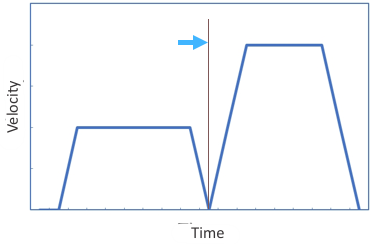
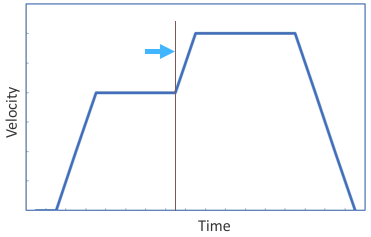
Controlword Bit 9:
- Allows blending moves together when setting a new setpoint with bit 4 while one is in progress
- Requires that Bit 5 = 0
|
Controlword Bit |
Value |
Function |
|---|---|---|
|
Bit 9 |
0 |
Start from standstill
|
|
Bit 9 |
1 |
Blends from current move into the next move
|
| Bit 9 = 0 | Bit 9 = 1 |
|---|---|
|
|
-
-
If bit 5 (Start immediately) is set, it will override the bit 9 behavior and the new setpoint will start immediately without continuing to its current target.
Status
The Statusword (6041h, 6841h Statusword - AxisX) can be read for handshaking purposes. It can indicate a fault or warning condition, status of the power stage, home attained, setpoint acknowledged, target position reached, etc.
Mode-Specific Statusword Bits
| Statusword Bits | Status |
|---|---|
| Bit 10 | Target position reached (within AXIS#.SETTLE.P) The behavior can be configured by AXIS#.CANOPEN.TARPOSMODE. |
| Bit 12 | Setpoint acknowledge |
| Bit 13 | Following error |
| Statusword Bit | Value | Controlword Bit 8 Value | Function |
|---|---|---|---|
| Bit 10 | 0 | 0 | Target position not reached |
| 1 | Axis decelerating | ||
| Bit 10 | 1 | 0 | Target position reached |
| 1 | Velocity dropped to AXIS#.ZEROV | ||
| Bit 12 | 0 | Previous setpoint already processed; waiting for new setpoint. | |
| Bit 12 | 1 |
Previous setpoint still in process; setpoint overwriting will be accepted. Bit 12 stays high after the move is complete, as long as Controlword bit 4 is high. Bit 12 turns off when Controlword bit 4 is turned off. |
|
| Bit 13 | 0 | No following error. | |
| Bit 13 | 1 |
This bit is set when the drive faults with F6001 “following error magnitude.” |
Example Sequence of Events
| Step | Object Name | Object | Sub-index | User Value |
|---|---|---|---|---|
| Set operation mode | Modes of operation | 6060h, 6860h Modes of operation - AxisX | 0 | 0x01h |
| Set parameters | Target position | 607Ah, 687Ah Target position - AxisX | 0 | User specified |
| Profile velocity | 6081h, 6881h Profile velocity in pp-mode - AxisX | 0 | User specified | |
| Profile acceleration | 6083h, 6883h Profile acceleration - AxisX | 0 | User specified | |
| Profile deceleration | 6084h, 6884h Profile deceleration - AxisX | 0 | User specified | |
| Ready for switch-on | Controlword | 6040h, 6840h Controlword - AxisX | 0 | 0x06h |
| Operation enable | Controlword | 6040h, 6840h Controlword - AxisX | 0 | 0x0Fh |
| Option1: Start from Standstill and Absolute Move | ||||
| Start from standstill (bit 5=0); absolute move (bit 6=0) | Controlword | 6040h, 6840h Controlword - AxisX | 0 | 0x0Fh |
| Start move (bit 4=1) | Controlword | 6040h, 6840h Controlword - AxisX | 0 | 0x1Fh |
| Halt (bit 8=1) | Controlword | 6040h, 6840h Controlword - AxisX | 0 | 0x11Fh |
| Resume from halt (bit 8=0) | Controlword | 6040h, 6840h Controlword - AxisX | 0x1Fh | |
| Quick stop (bit 2=0) | Controlword | 6040h, 6840h Controlword - AxisX | 0 | 0x1Bh |
| Resume from Quick stop | Controlword | 6040h, 6840h Controlword - AxisX | 0 | Step through state machine |
| Option 2: Start from Standstill and Relative Move | ||||
| Start from standstill (bit 5=0); relative move (bit 6=1) | Controlword | 6040h, 6840h Controlword - AxisX | 0 | 0x4Fh |
| Start move (bit 4=1) | Controlword | 6040h, 6840h Controlword - AxisX | 0 | 0x5Fh |
| Halt (bit 8=1) | Controlword | 6040h, 6840h Controlword - AxisX | 0 |
0x15Fh |
| Resume from halt (bit 8=0) | Controlword | 0 | 0x5Fh | |
| Quick stop (bit 2=0) | Controlword | 6040h, 6840h Controlword - AxisX | 0 | 0x5Bh |
| Resume from Quick stop | Controlword | 6040h, 6840h Controlword - AxisX | 0 | Step through state machine |
| Option 3: Start Immediate and Absolute Move | ||||
| Start immediate (bit 5=1); absolute move (bit 6=0) | Controlword | 6040h, 6840h Controlword - AxisX | 0 | 0x2Fh |
| Start move (bit 4=1) | Controlword | 6040h, 6840h Controlword - AxisX | 0 | 0x3Fh |
| Halt (bit 8=1) | Controlword | 6040h, 6840h Controlword - AxisX | 0 | 0x13F |
| Resume from halt (bit 8=0) | Controlword | 6040h, 6840h Controlword - AxisX | 0 | 0x3Fh |
| Quick stop (bit 2=0) | Controlword | 6040h, 6840h Controlword - AxisX | 0 | 0x3Bh |
| Resume from Quick stop | Controlword | 6040h, 6840h Controlword - AxisX | 0 | Step through state machine |
| Option 4: Start Immediate and Relative Move | ||||
| Start immediate (bit 5=1); relative move (bit 6=1) | Controlword | 6040h, 6840h Controlword - AxisX | 0 | 0x6Fh |
| Start move (bit 4=1) | Controlword | 6040h, 6840h Controlword - AxisX | 0 | 0x7F |
| Halt (bit 8=1) | Controlword | 6040h, 6840h Controlword - AxisX | 0 | 0x17F |
| Resume from halt (bit 8=0) | Controlword | 6040h, 6840h Controlword - AxisX | 0 | 0x7F |
| Quick stop (bit 2=0) | Controlword | 6040h, 6840h Controlword - AxisX | 0 | 0x7B |
| Resume from Quick stop | Controlword | 6040h, 6840h Controlword - AxisX | 0 | Step through state machine |
| Reset Start Move Bit Any Time During or After Move | ||||
| Option 1 Start from standstill and absolute move | Controlword | 6040h, 6840h Controlword - AxisX | 0 | 0x0Fh |
| Option 2 Start from standstill and relative move | Controlword | 6040h, 6840h Controlword - AxisX | 0 | 0x4Fh |
| Option 3 Start immediate and absolute move | Controlword | 6040h, 6840h Controlword - AxisX | 0 | 0x2Fh |
| Option 4 Start immediate and relative move | Controlword | 6040h, 6840h Controlword - AxisX | 0 | 0x6Fh |
Monitor
| Step | Object Name | Object | Sub-index | Value |
|---|---|---|---|---|
| Read status | Statusword bit 12 (setpoint acknowledge) | 6041h, 6841h Statusword - AxisX | 0 | 0 or 1 |
| Read status | Statusword bit 13 (following error) | 6041h, 6841h Statusword - AxisX | 0 | 0 or 1 |
| Read status | Statusword bit 10 (target reached) | 0 | 0 or 1 | |
| Read position actual internal value | Position actual internal value | 6063h, 6863h Position actual internal value - AxisX | 0 | |
| Read position actual value | Position actual value | 6064h, 6864h Position actual value - AxisX | 0 |
CANopen Scaling
The motion setpoints and actual values can be scaled using CANopen objects or the associated drive parameters. These include values for position, velocity, acceleration, deceleration and current (torque). See CANopen Scaling for details.
Scale factors affect the values of the motion setpoint objects and should be set prior to writing/changing the setpoint objects.


