








WorkBench Interface: Status Bar
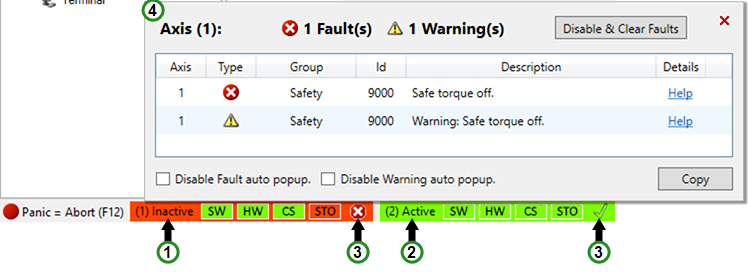
WorkBench 2.0 displays a multi-axis status bar with faults and warnings indicators.
|
|
Clicking on the status bar shows the device status. If the device supports safety, a separate Safety Status is displayed.
| Item | Description |
|---|---|
| Panic | Pressing this will immediately disable all devices. |
| SW | Indicates whether the software enable is active (green) or inactive (red). |
| HW | Indicates whether the hardware enable is active (green) or inactive (red). |
| CS | Indicates whether a controlled stop was issued (red) or not issued (green). |
| STO | Safe Torque Off (STO) is a restart lock safety feature that prevents a system restart. |


