Log Messages tabs
-
-
- Log messages provide important information when troubleshooting with KAS-IDE.
- When reporting an issue to Kollmorgen Support, copy/paste the logs in your report.
Log Messages - Local Log
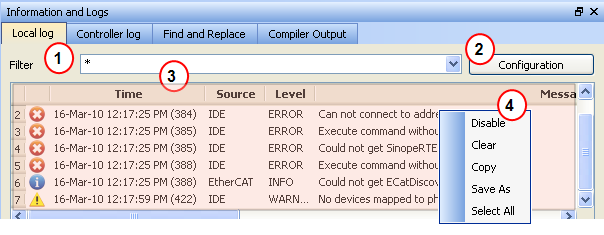
Figure 1: Log Messages - Local Log
Log messages are displayed on two tabs, Local log and Controller log.
- The Local Log tab shows all messages managed by the KAS-IDE to explain the current state of the system and to help identify any operation errors encountered when developing your system.
- The Controller Log shows all messages managed by the KAS Runtime.
Based on the configuration settings  )
)
-
-
The Configuration button is only available on the Controller log tab when the KAS-IDE is connected to a controller.
Log Messages - List of Fields
Every log message in the table widget 
|
Field |
Description |
|
Time |
Time when the log was recorded with the format: |
|
Identifies a software or hardware component issuing the messages. Each source is configured with a specific Level. |
|
|
Each message has one of the following levels with importance in ascending order: |
|
|
Message |
Text of the message issued from the source |
Log Messages - List of Buttons
The table contains a contextual menu  )
)
|
Command |
Description |
|
Disable/ |
You can stop the log recording at any time, so that no more messages are added. |
|
Clear |
Empty the list by erasing all the messages already recorded. |
|
Copy |
Copy the text of the selected messages to the clipboard (you can perform multi-selection with the Ctrl or Shift keys). |
|
Save As |
Save all the messages in a log file. |
|
Select All |
Select all the messages that are displayed in the table. |


