Quick Tune
Quick Tune is designed to get you up and running as quickly as possible with a robust tuning solution. The Quick Tune feature is accessed through the Express Setup View, Slider Tuning, and Terminal panes.
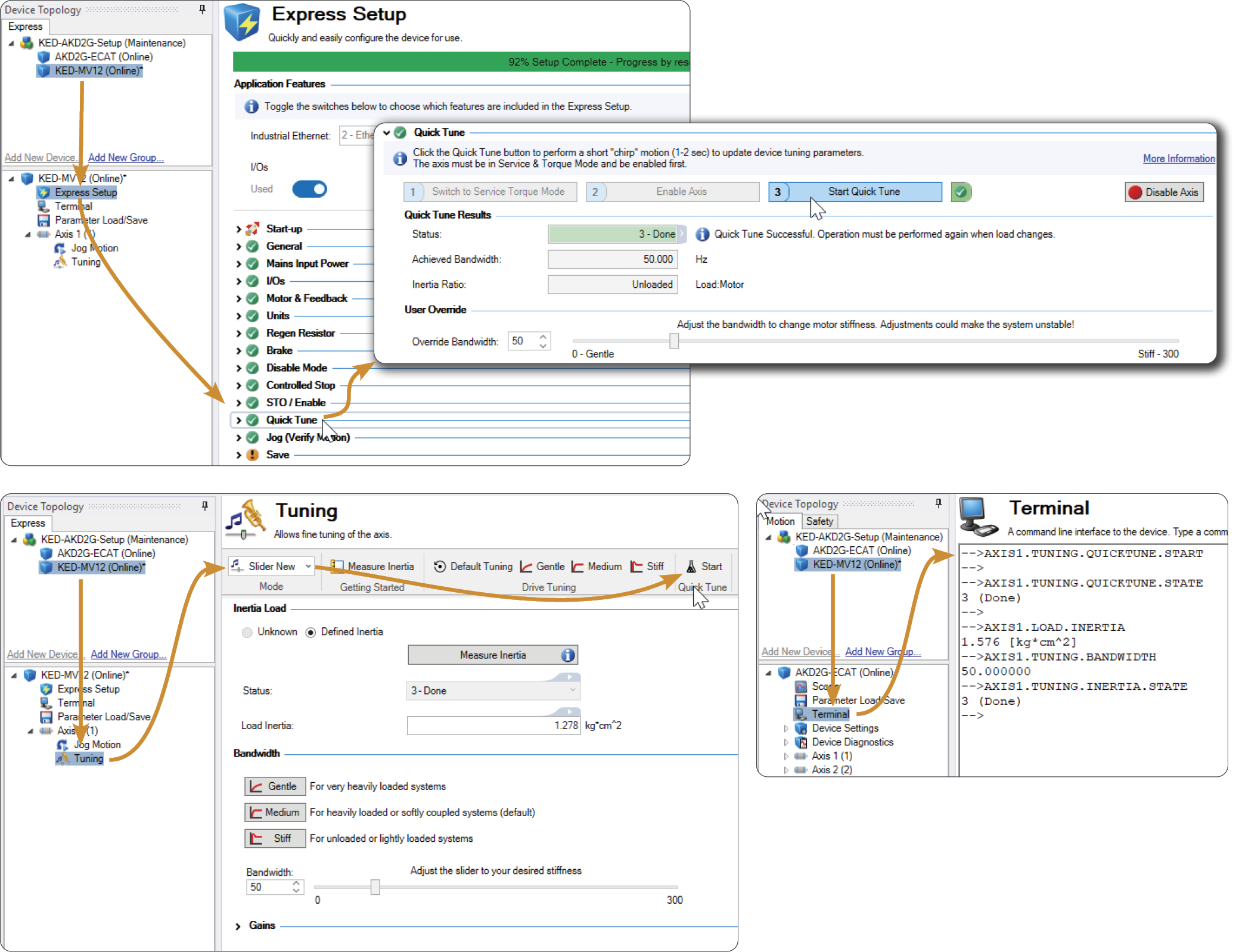
Quick Tune performs a quick inertia measurement with a connected motor. Based on the measurements a target bandwidth is set and tuning gains achieve this bandwidth.
After Quick Tune is complete, if the application requires stiffer or looser behavior, the slider tuner may be used to fine tune behavior. If the mechanics are more complicated and audible noise or ringing is present, the Performance Servo Tuner or Manual Tuning may be required to resolve these more advanced systems.
-
- Executing the QuickTune function after the system has been tuned will overwrite tuning results.
Quick Tune In-Depth
Once started (using AXIS#.TUNING.QUICKTUNE.START), a quick inertia measurement will be done to characterize the system. Based on inertia measured a suitable target bandwidth will be determined ( AXIS#.TUNING.TARGETBANDWIDTH). Tuning gains will be automatically set to achieve this bandwidth. After QuickTune is completed, AXIS#.TUNING.BANDWIDTH will report the actual bandwidth tuned.
You may also check AXIS#.LOAD.INERTIA to see what load inertia was detected by the algorithm.
If you wish to override the algorithm set AXIS#.TUNING.USERBANDWIDTH. The next time QuickTune is started, this user bandwidth will be used regardless of what inertia or resonances are detected.
-
- AXIS#.TUNING.USERBANDWIDTH should be used carefully as unstable motion can be caused if unsuitable values are used.
Related Keywords
AXIS#.TUNING.BANDWIDTH
AXIS#.TUNING.INERTIA.MISMATCHMAX
AXIS#.TUNING.INERTIA.MEASURE
AXIS#.TUNING.INERTIA.STATE
AXIS#.TUNING.QUICKTUNE.START
AXIS#.TUNING.QUICKTUNE.STATE
AXIS#.TUNING.TARGETBANDWIDTH
AXIS#.TUNING.USERBANDWIDTH
Referenced TopIcs
Slider Tuner
Express Setup View


