








Adding an Online TwinCAT Device
To add an online TwinCAT device to the project, perform the following.
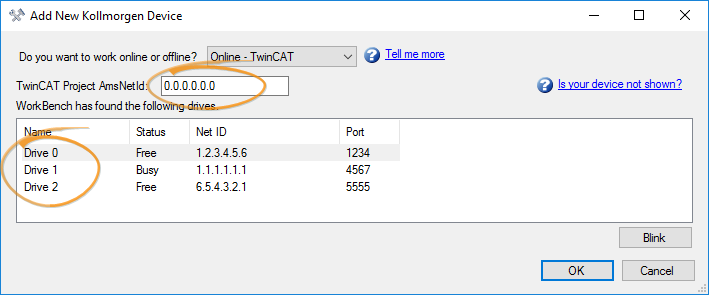
- Enter the AmsNetId from the network where your drives are connected.
- Select the device you want to add from the discovered devices.
- Validate by pressing OK.
-
- WorkBench must be installed on the same machine as TwinCAT in order to use that type of connection (TwinCAT ADS). If you are using EoE, your device is considered to be an Ethernet device, even if it is connected through TwinCAT.
-
-
If the device is not visible after entering the proper Project AmsNetId, ensure that WorkBench can find the TwinCAT ADS dll. Workbench needs to be able to find TcAdsDll.dll and it should be installed with TwinCAT (ensure to have the ADS runtime installed).
For example, TwinCAT 4026.x, on a x64 computer: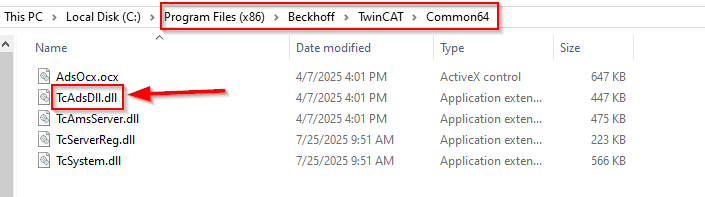
The path to the dll should be added to the PATH environment variable: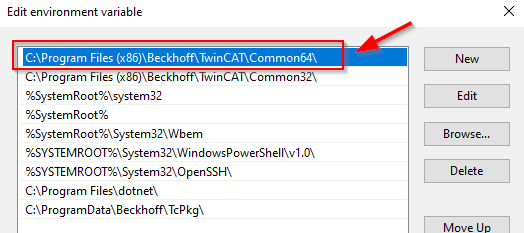
Depending on the TwinCAT installation and system, the dll file may reside in a different location, but the dll should always be accessible through the PATH environment variable. Normally, TwinCAT installation will configure it automatically.


