FB_AKDFltRpt


 Function Block - Outputs AKD drive fault information.
- Provide drive fault information the application program uses to determine next steps.
- Example: Perform a machine-controlled stop or perform an immediate disable of the servo drives.
- In the application program, sends output fault information from this UDFB to the HMI for review by the machine operator.
-
-
- This function block lists the earliest occurring fault first.
- This may not be the same fault as is being reported on an AKD's display, which is based on priority.
- The MCFB_AKDFault function block may be preferred as it reports the same error as displayed on the drive.
- The oFAULT output turns TRUE when the selected drive goes into a fault state.
- This function block outputs the:
- Total number of faults in the drive fault history variable. (Pre-Defined Error Field Object 1003h)
- Fault number and message for the last three drive faults.
- Each fault has two outputs: the fault number and a fault message.
- The fault number is the same number reported on the display of the drive.
- The fault message provides a short description of the fault.
- Example: If the first fault is a feedback error with a F401 is shown on the front of the drive, the output of this FB are:
- oFirstFaultNumber = 401.
- oFirstFaultMessage = Failed To Set Feedback Type.
- iResetfaultHistory resets the faults reported by the FB.
- oDriveNotUsed outputs 1 (True) if the axis is configured to Simulated in the ProjectEtherCAT setup screen.
- This function block can be used with either the PLCopen or Pipe Network Motion engines.
Inputs
|
Input |
Data Type See Data Types. |
Range |
Unit |
Default |
Description |
|---|---|---|---|---|---|
|
EN |
BOOL |
FALSE, TRUE |
N/A |
No default |
Enables the KollmorgenUDFB. Used in the FFLD editor only. |
|
iEtherCat_ID |
INT |
No range |
N/A |
No default |
EtherCAT address of AKD Drive. |
|
iRstFltHist |
BOOL |
FALSE, TRUE |
N/A |
No default |
When input is TRUE, clears all Faults saved to drives history. |
Outputs
|
Output |
Data Type See Data Types. |
Range |
Unit |
Description |
|---|---|---|---|---|
|
oFAULT |
BOOL |
FALSE, TRUE |
N/A |
TRUE if selected drive currently has a Fault. |
|
oNumberFaults |
DINT |
0 to 10 |
N/A |
Number of faults saved in the drive's history. |
|
oFirstFaultNumber |
DINT |
100 to 999 |
N/A |
Three-digit fault identifier. |
|
oFirstFaultMessage |
STRING |
No range |
N/A |
Description of the fault. |
|
oSecondFaultNumber |
DINT |
100 to 999 |
N/A |
Three-digit fault identifier. |
|
oSecondFaultMessage |
STRING |
No range |
N/A |
Description of the fault. |
|
oThirdFaultNumber |
DINT |
100 to 999 |
N/A |
Three-digit fault identifier. |
|
oThirdFaultMessage |
STRING |
No range |
N/A |
Description of the fault. |
|
oDriveNotUsed |
BOOL |
FALSE, TRUE |
N/A |
Is this drive:
|
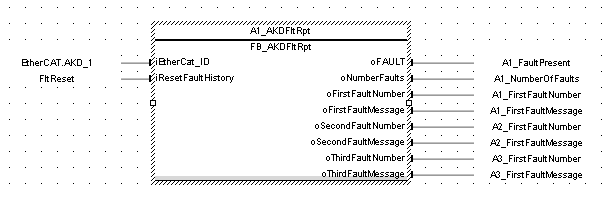
FBD Language Example
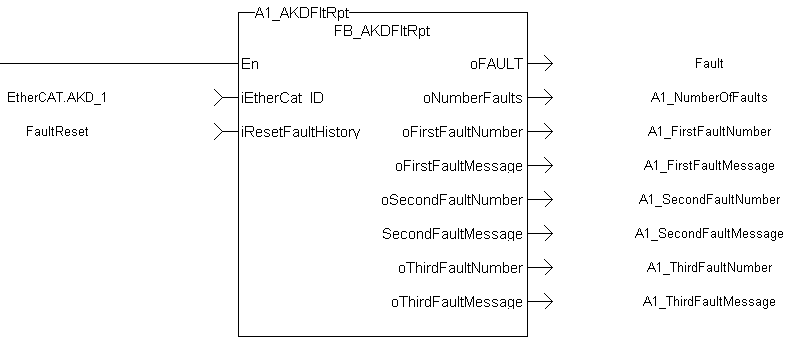
FFLD Language Example
IL Language Example
Not available.
ST Language Example
//Execute the Function Block
1_AKDFltRpt (1001, resetFaultHistST);

//Read Function Block Outputs
AKD1_Fault:= A1_AKDFltRpt.oFault;
AKD1_NumFault:= A1_AKDFltRpt.oNumberFaults;
AKD1_FirstFaultNumber:= A1_AKDFltRpt.oFirstFaultNumber;
AKD1_FirstFaultMessage:= A1_AKDFltRpt.oFirstFaultMessage;
AKD1_SecondFaultNumber:= A1_AKDFltRpt.oSecondFaultNumber;
AKD1_SecondFaultMessage:= A1_AKDFltRpt.oSecondFaultMessage;
AKD1_ThirdFaultNumber:= A1_AKDFltRpt.oThirdFaultNumber;
AKD1_ThirdFaultMessage:= A1_AKDFltRpt.oThirdFaultMessage;
;
-
-
A1_FaultReporting is an instance of the FB_S700FltRpt function block.
See Also
- MC_ReadStatus (PLCopen Motion Engine)
- MCFB_AKDFault
- MLAxisStatus (Pipe Network Motion Engine)


