Set the Compilation Options
Click the  button to open the Project Settings dialog box. (Figure 1)
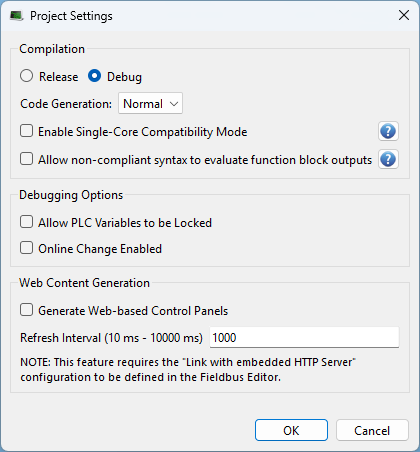
Figure 1: Project Settings dialog box
- Select the Release option to if step-by-step debugging is not required and to give highest performance to the application.
- Select the Debug option to use Step-By-Step Debugging during simulation or online testing.
When additional statements are incorporated in the code (e.g., trace outputs), you must select the Debug compiling mode so that they are taken into consideration (in RELEASE mode, those statements are not included).
See:
Code Generation
The code compilation options are: Normal and Optimized.
Normal
- Normal code:
- Development and Debugging: Normal code allows breakpoints, step through PLC code, and use online change.
- Normal code is interpreted
 so the interpreter can apply many additional runtime checks that would be harder to implement with Optimized code.
- Normal code is interpreted
-
- Using Normal code is recommended to take advantage of all KAS PLC features unless the controller is unable to meet performance requirements.
Optimized
-
- Starting with the KAS v5.00 release, the Optimized Code Generation option is supported in PCMM2G projects.
For optimal execution performance, the KAS compiler can generate native machine code for the PLC application by using an integrated a C-language compiler.
In the compilation mode, the process is in this order:
- The KAS compiler generates P-Code for all PLC programs.
- The P-Code is translated into C source files.
- The source files are compiled using the controller-specific C tool chain included in the KAS-IDE.
When optimized code generation is enabled:
- These debugging features are still available:
- Display of PLC variable values in the KAS-IDE.
- Editing of PLC variable values by the KAS-IDE.
- Has these limitations:
- PC Online Change is not available.
- WAIT and WAIT_TIME are not supported.
These features are disabled when optimized code generation is enabled:
- Breakpoints
- Debugging (see Test and Debug the Project).
- Step-By-Step Debugging


