User Options dialog box
Usage
The User Options dialog box is used to define specific KAS loading, saving, backup settings.
Access
 Click to view access to the dialog box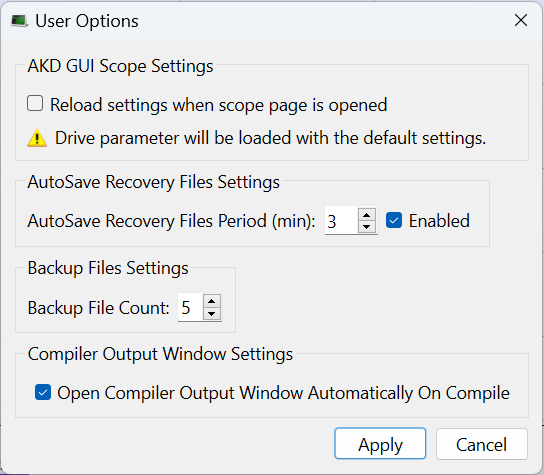
Dialog box Description
|
Section |
Element |
Description |
|---|---|---|
|
AKD GUI Scope Settings section |
Reload settings when scope page is opened check box |
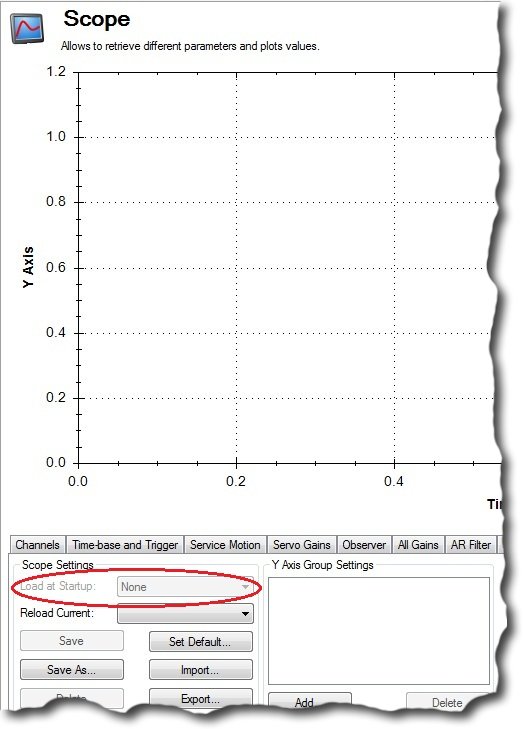
Select the check box in this area to enable or disable the Load at startup option in the AKD GUI Scope Settings tab. (Figure 2) |
|
AutoSave Recovery File Settings section |
AutoSave Recovery Files Period (min): spin box |
This area is used to enable or disable automatically saving project recovery files at a specified interval.
|
|
|
AutoSave Recovery Files Period (min): Enabled check box |
|
|
Backup File Settings section |
Backup File Count spin box |
This area is used to configure the number of automatic backup of KAS project or library files when the project or library is saved.
|
|
Compiler Output Window Settings section |
Open Compiler Output Window Automatically On Compile check box |
Select the Open Compiler Output Window Automatically On Compile check box to automatically open the Compiler Output tab each time a KAS project is compiled. |
|
|
Apply button |
Click OK to save the changes or selections and close the dialog box. |
|
|
Cancel button |
Click Cancel to discard all changes or selections and close the dialog box. |
 ) or disabled (
 ).
). 


