OPC UA - Endpoint dialog box
Usage
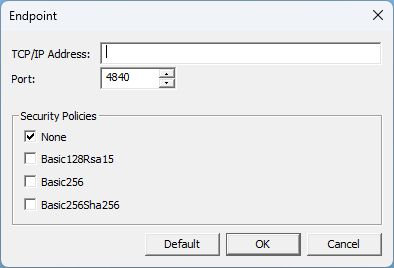
The Endpoint dialog box is used to add an individual endpoint to an OPC UA Server.
See OPC UA - Insert an Endpoint.
Access
 Click to view access to the dialog box
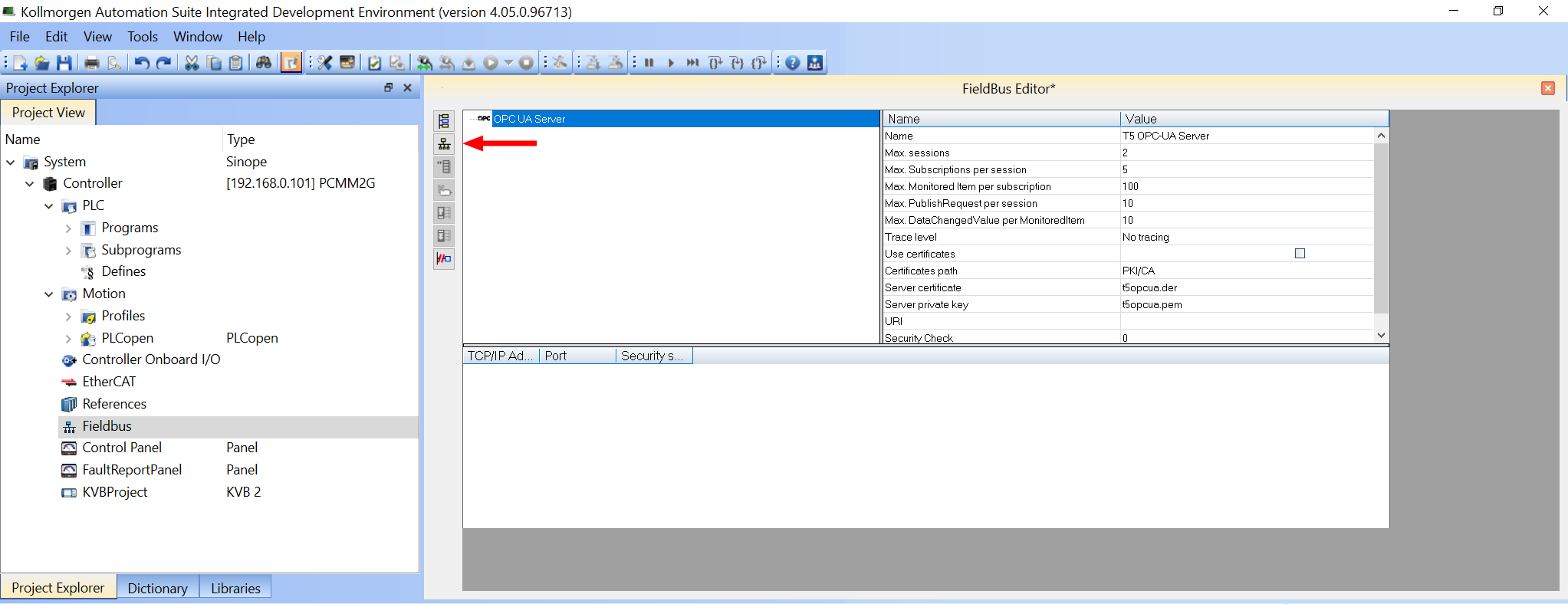
 ).
).
Dialog box Description
|
Section |
Element |
Description |
|---|---|---|
|
|
TCP/IP Address text box |
|
|
|
Port spin box |
|
|
Security Policies section |
None check box |
|
|
|
Basic128Rsa15 check box |
|
|
|
Basic256 check box |
Click the Basic256 or Basic256Sha256 check box to use the 256-bit Basic as the message encryption algorithm. |
|
|
Basic256Sha256 check box |
Click the Basic256Sha256 check box to use both the Basic256 and SHA256 security policies.
|
|
|
Default button |
Click Default to reset all changes or selections back to the default settings. |
|
|
OK button |
Click OK to save the changes or selections and close the dialog box. |
|
|
Cancel button |
Click Cancel to discard all changes or selections and close the dialog box. |


