Plug a Probe from the Pipe Network
A probe (variable) can be directly plugged or mapped to the Oscilloscope from the Pipe Network.
Procedure
- Right-click on a Pipe Block.
- In the menu, click the Map to Oscilloscope channel …. (Figure 1)
- Define the probe parameters.
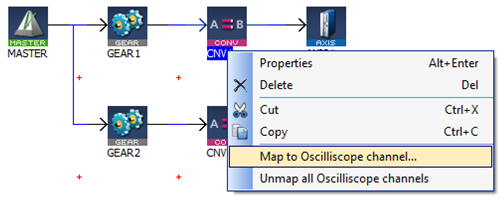
Figure 1: Map to Oscilloscope channel … menu option
The Map to Oscilloscope channel … dialog box opens. (Figure 2)
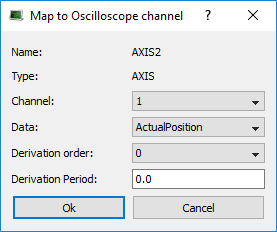
Figure 2: Map to Oscilloscope channel … dialog box
|
Field |
Description |
|---|---|
|
Channel |
Channel's number where the variable has to be plugged |
|
Data |
Desired variable information to show (the list depends on the type of Pipe Block. |
|
Derivation Order |
|
|
Derivation Period |
|
|
Name |
Variable's name. |
|
Type |
Variable's type. |
-
-
The Map to Oscilloscope channel … menu option is disabled if the KAS-IDE is not connected to the controller or if the project is not running.
This menu option is disabled when the Trace Times Channel Group is selected in the Oscilloscope Control Panel.


