Feedback Devices View
This view provides up-to-date data about the devices. Clicking on the feedback number field opens a Feedback # View to configure it.
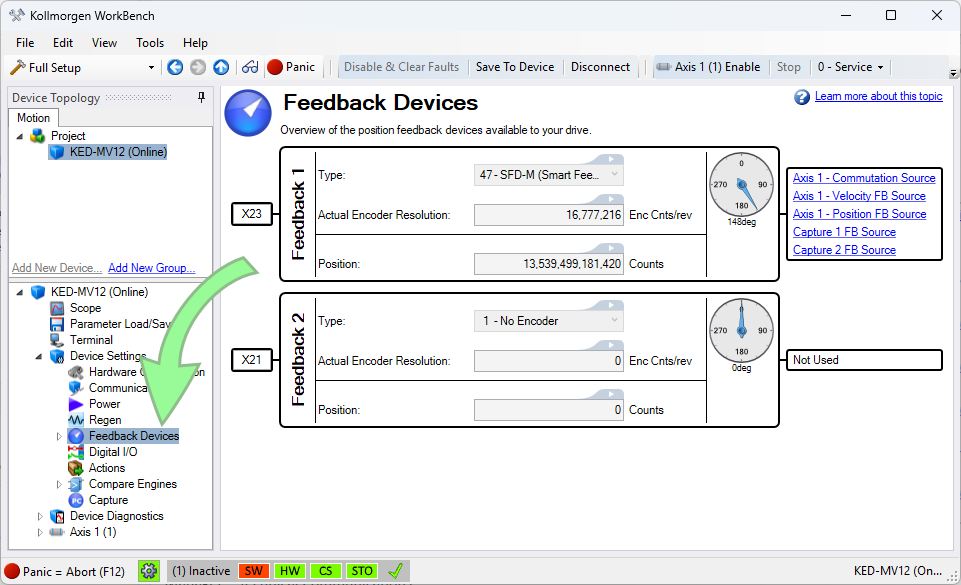
| Element | Description | Parameter | |
|---|---|---|---|
| X# | Indicates the connector used for the feedback | ||
| Feedback # block | [number] | Identifies the feedback and serves as a link to the configuration view | |
| Type | Indicates the feedback type identified | FB#.IDENTIFIED | |
| Actual Encoder Resolution |
This parameter reports the actual encoder resolution of the feedback device. The drive calculates the FB#.RES value based on the encoder characteristics. It is provided in encoder counts/rev for rotary encoders and encoder counts/mm for linear encoders. |
FB#.RES | |
| Position | Current position in raw feedback counts | FB#.P | |
| Graphical Indicator | Visually indicates the position of the feedback within one revolution | ||
| FB Usage | Indicates how the feedback is being used by an axis. Clicking an entry will open the view configuration. | ||
Jump to a section about Feedback:


