Using the EWF"Enhanced Write Filter" protects a volume from write access from the command line should only be performed by advanced users. Using the application is easier and more reliable.
The EWF should be activated on the PAC"Programmable Automation Controller" PAC is a compact controller that combines the features and capabilities of a PC-based control system with that of a typical programmable logic controller (PLC). A PAC thus provides not only the reliability of a PLC, but also the task flexibility and computing power of a PC. Additionally, because they function and communicate over popular network interface protocols, PACs are able to transfer data from the machines they control to other machines and components in a networked control system after the system is running and the PAC configuration is complete. If you want to change the CF image (such as a new KAS version or downloading a new application), then turn off the EWF filter, make the change, and then reactivate EWF.
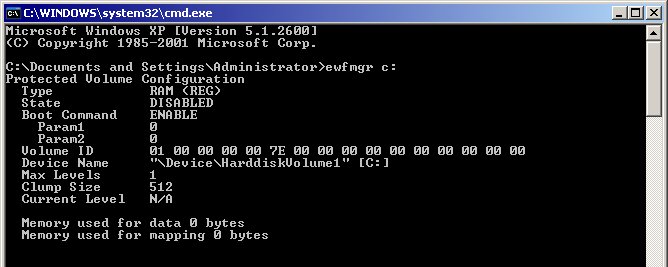
To ensure that the command has been entered correctly, execute the DOS command shell ewfmgr c: prior to rebooting the PAC. Check the field Boot Command, which should be set to "ENABLE", as seen in the image below.
If several commands are executed, only the latest will take effect after the reboot. To be sure about the latest command, execute the process described above.
The EWF has to be disabled to perform changes on a PAC. After the changes are made the EWF is re-enabled.
It is important to note that the maximum overlay size is a little more than 300 MB. Windows runs out of memory and crashes if this available space is exceeded, resulting in the error "Delayed Write Failed. Windows was unable to save all data for the file". As a consequence, when making important changes or file copy actions, do not forget to disable EWF first, and re-enable it when the operations are complete.
To commit changes without disabling and re-enabling EWF, a single commit can be commanded:
|
Stay Connected with Kollmorgen       
|
Copyright © 2015 Kollmorgen™ |

|