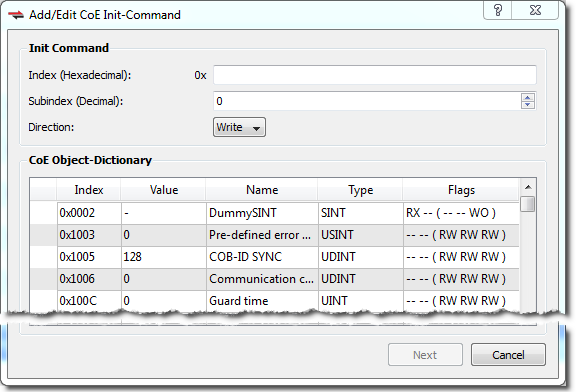
This command allows you to construct a new Init Command by supplying Index, Subindex, Value, Comment, Transition, and Direction attributes. The dialog lists the device's object dictionary and the objects are filtered based on the Direction currently selected, e.g. if "Write" is selected then the Read-only objects are not shown.
The Next button is available once the Index and Subindex fields have values.
 If the Init Command is already present in the dictionary:
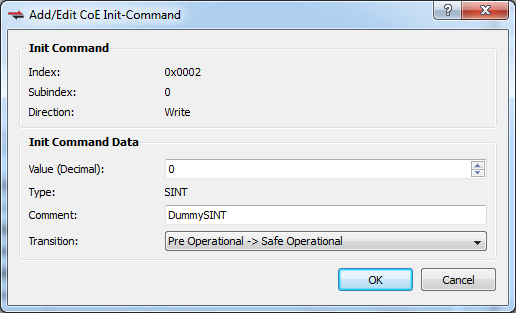
If the Init Command is already in the dictionary (i.e. the Index and Subindex you specified are already used) then you are presented with a dialog which allows you to specify the Value, a Comment, and the Transition.
Clicking OK adds the command to the appropriate transition group in the CoE Init Commands tab and setes the Source attribute to User.
If the Init Command data type is an array of bytes, then all the bytes can be entered in HexBinary format in the Value text box. The size of the array determines the maximum data that can be entered.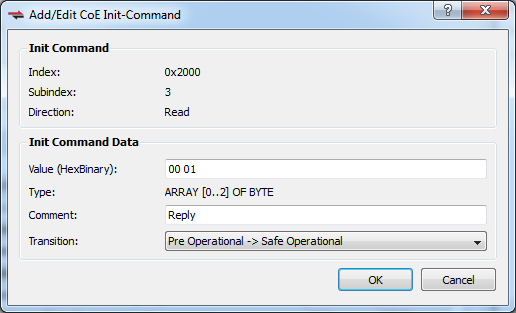
If the Init Command is not present in the dictionary:
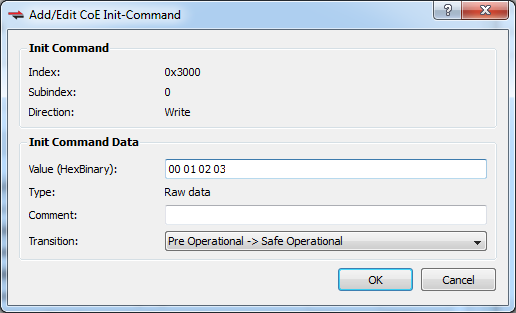
Adding a new command (i.e. the Index and Subindex are not in the dictionary) presents you with a dialog which allows you to specify a Value, Comment, and Transition.
Clicking OK adds the command to the appropriate transition group in the CoE Init Commands tab and sets the Source attribute to User.
|
Stay Connected with Kollmorgen       
|
Copyright © 2015 Kollmorgen™ |

|