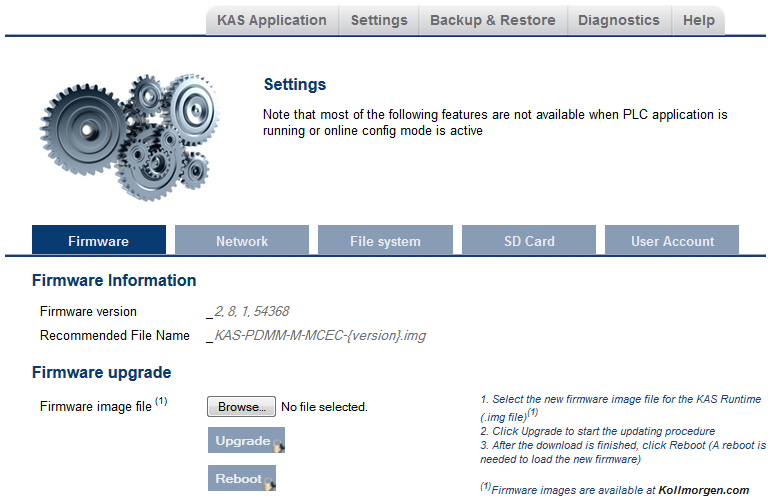
This tab displays the firmware version. Additionally, you may upgrade the firmware from this tab.
This section describes how to upgrade the PDMM or PCMM's firmware using the web server. This operation downloads the KAS RuntimeIn computer science, runtime (or run-time) describes the operation of a computer program, the duration of its execution, from beginning to termination (compare compile time). Within KAS, runtime also refers to the virtual machine that manage the program written in a computer language while it is running and its version number to the on-board flash memory in the controller.
The firmware files are IMG files with the following name format:KAS-PCMM-M-{model-code}-{software-revision}.imgKAS-PDMM-M-{model-code}-{software-revision}.img
The model-code reflects the CPU speed.
| Model | CPU Speed |
|---|---|
| MCEC | 800 MHz |
| M1EC | 1.2 GHz |
The recommended file is displayed in the Current Information section, as seen below.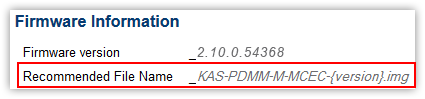
A message and a throbberAn animated element which indicates something is in progress. Interactions should wait until the process is complete. are shown across the web page, indicating that maintenance is in progress. The device's 7-segment display will animate chasing lights.
| Successful upgrade | A message similar to the following is shown upon a successful firmware upgrade: Upload of firmware KAS-PDMM-M-MCEC-2.10.0.54368.img successful. Please reboot the unit in order to boot on the new firmware, and once reboot is performed, press CTRL+F5 in your web browser to force a page refresh. |
| Incompatible firmware | An error message similar to the following will be displayed if the wrong firmware file was downloaded: The file provided is not compatible with this device. The file name should be... "KAS-PDMM-M-MCEC-{version}.img" |
A message and a throbberAn animated element which indicates something is in progress. Interactions should wait until the process is complete. are shown over the web server while the reboot is in progress. The login session will no longer be valid when the reboot is complete. The web server will display a message to indicate the user has been logged out.
Do not try to refresh the web page until firmware upgrade is done.
|
Stay Connected with Kollmorgen       
|
Copyright © 2015 Kollmorgen™ |

|