Open topic with navigation
Browse Variable Tab
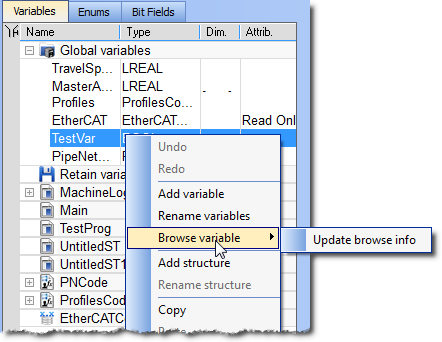
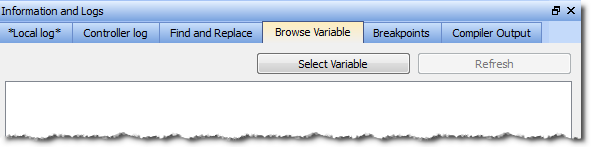
This tab is used to browse all instances of a variable. It will show the locations and usage of each instance of a single variable. There are two ways to populate the tab:
Using the Browse Variable tab
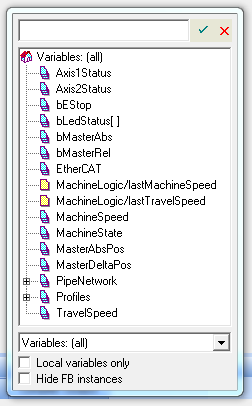
- Click the Select Variable button to open a variable selection pop-up window.
- Select a variable from the pop-up list.
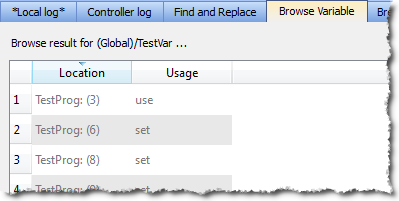
- The Browse Variable tab is updated with a two-column table detailing the variable's usage
- Location shows the file name and line number where the variable is used.
- Usage shows whether the variable is being read (use) or written to (set).
- Double-click on an entry to be taken to the correspondinglocation in the editor.
-
-
- The process of generating the Browse Variable content after clicking Select Variable can take a significant amount of time, depending upon the number of files in the project. If there are no modifications to the project, further browse operations will not take any time.
- The browse information may not be current if changes are made to the project.
- The browser information needs to be refreshed after saving and compiling a project. A message is shown in the tab to alert you if the information may not be accurate.
Using the Dictionary's Browse Variable menu item
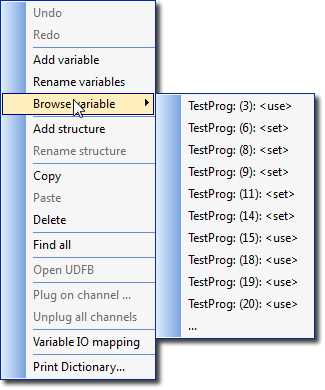 The first time this menu is accessed (per project instance) you are presented with Update browse info. This updates the browse data. Further selections of any variable result in the location and usage being shown directly in the menu.
- Selecting an entry will take you to the corresponding location in the editor.
When the menu has more than ten entries an ellipsis (…) is added to the bottom of the menu.
- Selecting the ellipsis (…) brings you to the Browse Variable tab, which will be populated with the variable locations and usages.
|
|
Copyright © 2015 Kollmorgen™
|
|

|
Open topic with navigation