To use some of the additional features of the Profinet controller field bus editor, such as “Browse Network for Slaves”, you need to install the "CD Prot" driver. The installer can be found in <Kollmorgen Automation Suite installation directory>\Bin\CDProtDriver.
Please note that your computer will need to be rebooted after installing the driver.
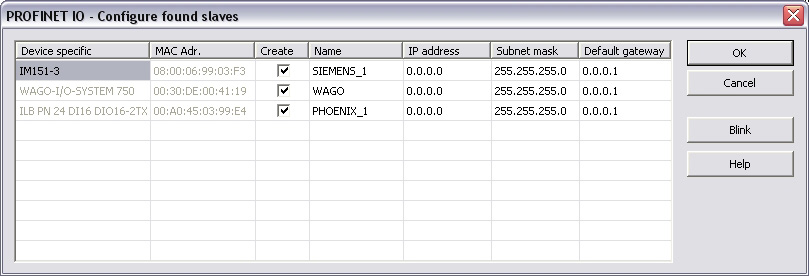
This command is available in the context menu of the network adapter. All connected Profinet IO devices are listed up.
Select the devices you want to add in the tree via the checkbox in the column Create.
The Network Link (or another) -LED of the marked device blinks for three seconds when pressing the Blink button.
Set the device names (column Name) here. A device name can consist of labels and must follow these conventions:
Set the IP address of the device here. By clicking into the grid the Default gateway will be set automatically.
Click OK after setting the IP-parameters (address, subnet mask, default gateway).
After adding the Profinet devices to the controller they need to be configured. Double click on the referring device. Load the GSDML file. If ambiguous module IDs are found they are shown in a window. Choose the right module in the combo-box.
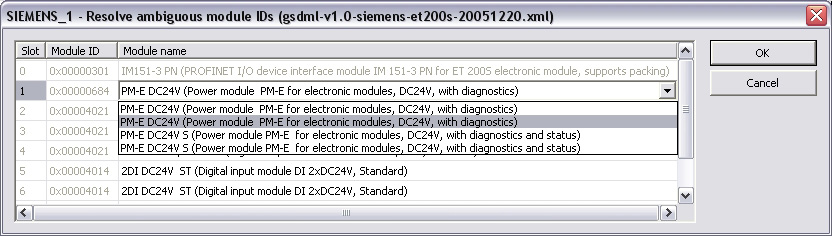
Automatic creation of variables can be done primal after this step.
With this context menu command it is possible to rename the slave names.
With this context menu command it is possible to read out the module configuration again.
Find this command in the context menu of the device. Based on the defined device modules the referring variables are generated.
Within the same dialog it is possible to define the variables for
Based on the Profinet standard the referring variables can be generated:
Based on the defined device modules the referring IOPS- and IOCS-variables are generated.
|
Stay Connected with Kollmorgen       
|
Copyright © 2015 Kollmorgen™ |

|