Open topic with navigation
Device Not Shown
If your specific drive is not shown in the list, then WorkBench has not been able to find the drive.
Common reasons why your drive is not shown in the list include the following:
- The drive is not powered on.
- One of the network cables between your and the drive are not connected correctly. You can check if the cable is connected to the drive by checking that the link LED on the connector is on continuously. If your PC has a link LED, then you should check that this LED is also continuously lit (usually, this LED is next to the RJ45 socket on your PC).
- A router on the network between your PC and the drive is blocking the drive discovery messages. Make sure that port 5002 is not blocked by any routers or firewalls. You can enter the IP address of your drive directly into WorkBench if a router or firewall is blocking port 5002. Often, firewalls are the cause of a blocked connection.
- Your PC and the drive are on different subnets. Networks, especially those with many devices on them, are split up into multiple subnets. The discovery protocol used to find drives will only work if your PC and the drive are both on the same subnet .You can enter the IP address of the drive directly into WorkBench if this is the case.
- The network mask defines more than 512 possible addresses. In this case, WorkBench will not ping all of these addresses, so you must unblock discover ports or specify directly the IP address of your drive. When an adapter has such a network mask, its background will be shown as yellow to warn that this network will not be discovered with all discover protocols.
Find and Enter IP Address
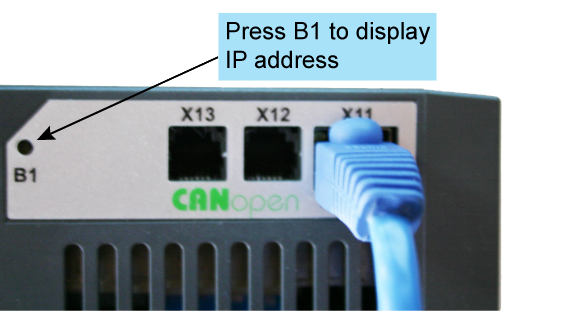
You can view the drive IP address on the drive display by pressing the button shown below. The display shows the digits of the IP address in sequence, with dots separating the numbers. You should see four numbers separated by three dots, for example, 192.168.1.5.
You can enter the IP address if you press More and check the Specify Address box.
TwinCAT Drive Not Shown
If no TwinCAT device is shown, see Find and Enter AmsNetId on pg. 1
|
|
Copyright © 2015 Kollmorgen™
|
|

|
Open topic with navigation


