 MCFB_StepLimitSwitch
 MCFB_StepLimitSwitch
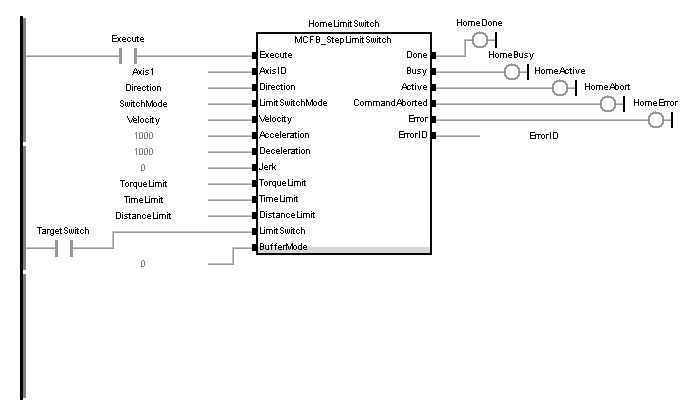
This function block performs a single-axis home to a limit switch. In this case the limit switches (always active once moving part working area has been surpassed) are used for homing procedure.
The following figure shows the function block I/O:
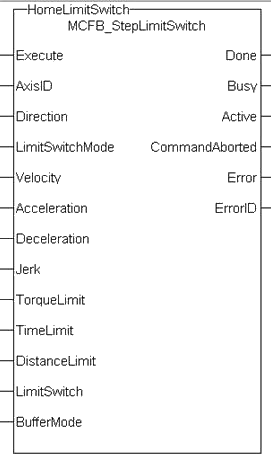
Figure 11-211: MCFB StepLimitSwitch
|
Execute |
Description |
Request the homing step procedure at rising edgeA rising edge is the transition of a digital signal from low to high. It is also called positive edge. Outputs are reset when execute input is false. |
||||||||||||||
|
Data type |
BOOL |
|||||||||||||||
|
Range |
[0 , 1] |
|||||||||||||||
|
Unit |
n/a |
|||||||||||||||
|
Default |
— |
|||||||||||||||
|
AxisID |
Description |
Name of a declared instance of the AXIS_REF library function |
||||||||||||||
|
Data type |
||||||||||||||||
|
Range |
[1 , 256] |
|||||||||||||||
|
Unit |
n/a |
|||||||||||||||
|
Default |
— |
|||||||||||||||
|
Direction |
Description |
Define the axis homing direction
|
||||||||||||||
|
Data type |
BOOL |
|||||||||||||||
|
Range |
[0 , 1] |
|||||||||||||||
|
Unit |
n/a |
|||||||||||||||
|
Default |
— |
|||||||||||||||
|
LimitSwitchMode |
Description |
Limit switchSwitch limiting the traverse path of the machine; implemented as n.c. (break) contact state to complete homing
|
||||||||||||||
|
Data type |
DINT |
|||||||||||||||
|
Range |
[0 , 3] |
|||||||||||||||
|
Unit |
n/a |
|||||||||||||||
|
Default |
— |
|||||||||||||||
|
Velocity |
Description |
Commanded velocity for the homing move |
||||||||||||||
|
Data type |
LREAL |
|||||||||||||||
|
Range |
— |
|||||||||||||||
|
Unit |
User unit/sec |
|||||||||||||||
|
Default |
— |
|||||||||||||||
|
Acceleration |
Description |
Commanded acceleration for the homing move |
||||||||||||||
|
Data type |
LREAL |
|||||||||||||||
|
Range |
— |
|||||||||||||||
|
Unit |
User unit/sec2 |
|||||||||||||||
|
Default |
— |
|||||||||||||||
|
Deceleration |
Description |
Commanded deceleration for the homing move |
||||||||||||||
|
Data type |
LREAL |
|||||||||||||||
|
Range |
— |
|||||||||||||||
|
Unit |
User unit/sec2 |
|||||||||||||||
|
Default |
— |
|||||||||||||||
|
Description |
Commanded jerkIn physics, jerk is the rate of change of acceleration; more precisely, the derivative of acceleration with respect to time for the homing move (if zero, then trapezoidal acc/dec is used) |
|||||||||||||||
|
Data type |
LREAL |
|||||||||||||||
|
Range |
— |
|||||||||||||||
|
Unit |
User unit/sec3 |
|||||||||||||||
|
Default |
— |
|||||||||||||||
|
TorqueLimit |
Description |
Maximum torqueTorque is the tendency of a force to rotate an object about an axis. Just as a force is a push or a pull, a torque can be thought of as a twist applied for the homing move entered in thousandths of maximum torque, e.g. "250" is 250/1000, or 25%. |
||||||||||||||
|
Data type |
LREAL |
|||||||||||||||
|
Range |
— |
|||||||||||||||
|
Unit |
User unit |
|||||||||||||||
|
Default |
— |
|||||||||||||||
|
TimeLimit |
Description |
Maximum time for homing move to complete. If exceeded the homing procedure will error out. 0= no time limit |
||||||||||||||
|
Data type |
TIME |
|||||||||||||||
|
Range |
— |
|||||||||||||||
|
Unit |
sec |
|||||||||||||||
|
Default |
— |
|||||||||||||||
|
DistanceLimit |
Description |
Maximum distance for homing move to complete. If exceeded the homing procedure will error out. 0= no distance limit |
||||||||||||||
|
Data type |
LREAL |
|||||||||||||||
|
Range |
— |
|||||||||||||||
|
Unit |
User unit |
|||||||||||||||
|
Default |
— |
|||||||||||||||
|
LimitSwitch |
Description |
The limit switch input I/O point |
||||||||||||||
|
Data type |
BOOL |
|||||||||||||||
|
Range |
[0 , 1] |
|||||||||||||||
|
Unit |
n/a |
|||||||||||||||
|
Default |
— |
|||||||||||||||
|
BufferMode |
Description |
Define the homing move start action
|
||||||||||||||
|
Data type |
SINT |
|||||||||||||||
|
Range |
[0 , 5] |
|||||||||||||||
|
Unit |
n/a |
|||||||||||||||
|
Default |
— |
|
Done |
Description |
Indicates the move completed successfully. The Command Position has reached the endpoint |
||||||||||||||
|
Data type |
BOOL |
|||||||||||||||
|
Unit |
n/a |
|||||||||||||||
|
Busy |
Description |
High from the moment the Execute input is one-shot to the time the move is ended |
||||||||||||||
|
Data type |
BOOL |
|||||||||||||||
|
Unit |
n/a |
|||||||||||||||
|
Active |
Description |
Indicates this move is the active move |
||||||||||||||
|
Data type |
BOOL |
|||||||||||||||
|
Unit |
n/a |
|||||||||||||||
|
CommandAborted |
Description |
Indicates the move was aborted |
||||||||||||||
|
Data type |
BOOL |
|||||||||||||||
|
Unit |
n/a |
|||||||||||||||
|
Error |
Description |
Indicates an invalid input was specified or the move was terminated due to an error |
||||||||||||||
|
Data type |
BOOL |
|||||||||||||||
|
Unit |
n/a |
|||||||||||||||
|
ErrorID |
Description |
Indicates the error if Error output is set to TRUE
|
||||||||||||||
|
Data type |
INT |
|||||||||||||||
|
Unit |
n/a |
This homing procedure performs a homing function searching for sensorA sensor is a type of transducer that converts one type of energy into another for various purposes including measurement or information transfer using only LimitSwitches. (A LimitSwitch has 1 “Off” (or “On”) area).
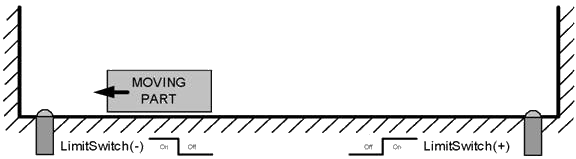
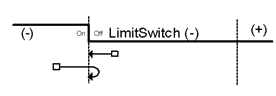
|
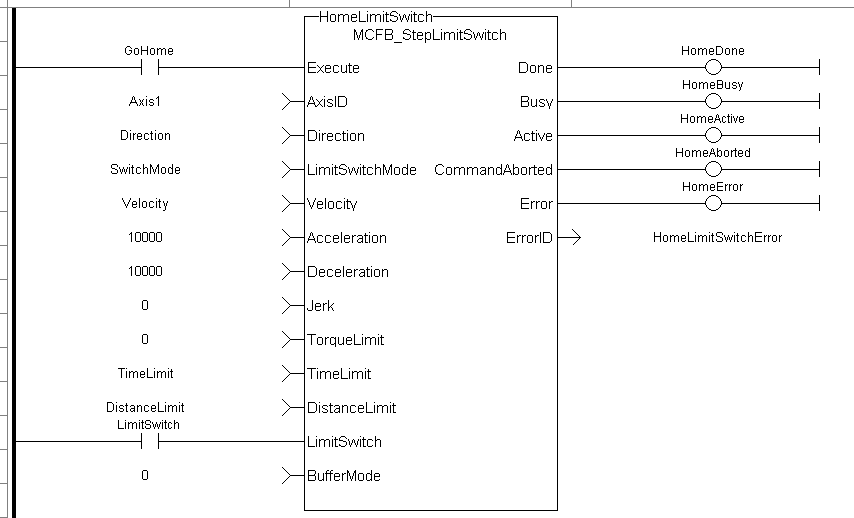
PositiveDirection :=0; RisingEdge :=2; Velocity :=10000.0; TorqueLimit :=50.0; TimeLimit :=T#10s; DistanceLimit :=10000.0;
Inst_MCFB_StepLimitSwitch( True, Axis1, PositiveDirection, RisingEdge, Velocity, 1000, 1000, 0, TorqueLimit, TimeLimit, DistanceLimit, LimitSwitch, 0 );
HomeComplete :=Inst_MCFB_StepLimitSwitch.Done; HomeBusy :=Inst_MCFB_StepLimitSwitch.Busy; HomeActive :=Inst_MCFB_StepLimitSwitch.Active; HomeAborted :=Inst_MCFB_StepLimitSwitch.CommandAborted; HomeError :=Inst_MCFB_StepLimitSwitch.Error; HomeErrorID :=Inst_MCFB_StepLimitSwitch.ErrorID;
(* LimitSwitch is a declared I/O point *)
|
|
Stay Connected with Kollmorgen       
|
Copyright © 2015 Kollmorgen™ |

|
 [Top]
[Top]