 MC_CreateAxis
 MC_CreateAxis
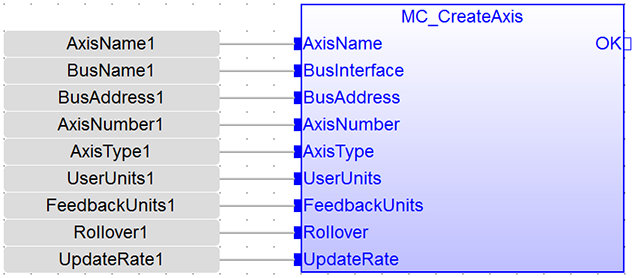
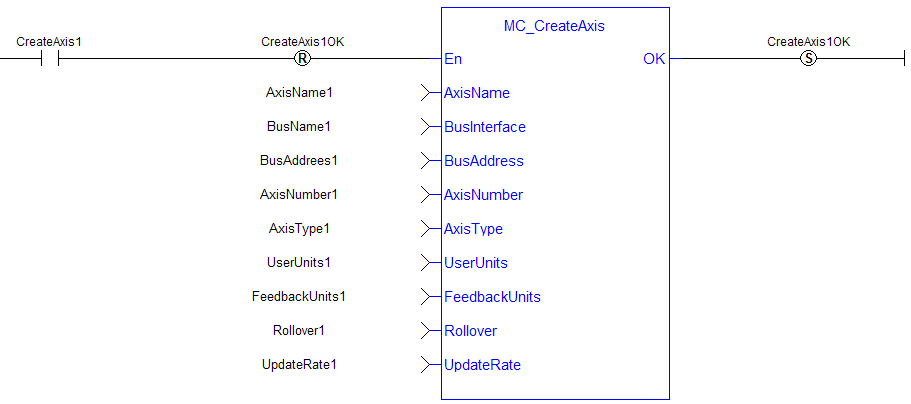
MC_CreateAxis must be called between MLMotionInit and MLMotionStart.

For more detail on how inputs and outputs work, refer to PLCopen Function Blocks - General Rules
|
En |
Description |
Requests to create a PLCopen axis |
|
Data type |
BOOL |
|
|
Range |
0, 1 |
|
|
Unit |
n/a |
|
|
Default |
— |
|
|
AxisName |
Description |
Axis name |
|
Data type |
STRING |
|
|
Range |
— |
|
|
Unit |
n/a |
|
|
Default |
— |
|
|
BusInterface |
Description |
Bus interface identifier: “MSBusDriver” = KAS Simulator interface |
|
Data type |
STRING |
|
|
Range |
— |
|
|
Unit |
n/a |
|
|
Default |
— |
|
|
BusAddress |
Description |
Address of the drive on the bus |
|
Data type |
DINT |
|
|
Range |
bus dependent |
|
|
Unit |
n/a |
|
|
Default |
— |
|
|
AxisNumber |
Description |
Axis number |
|
Data type |
UINT |
|
|
Range |
[1,256] |
|
|
Unit |
n/a |
|
|
Default |
— |
|
|
AxisType |
Description |
Axis type: 0 (MC_AXIS_TYPE_SERVO) denotes servo 1 (MC_AXIS_TYPE_DIGITIZING) denotes digitizing 2 (MC_AXIS_TYPE_VIRTUAL_SERVO) denotes virtual servo |
|
Data type |
USINT |
|
|
Range |
[0,1] |
|
|
Unit |
n/a |
|
|
Default |
— |
|
|
UserUnits |
Description |
User unit portion of the user unit/feedback unit ratio |
|
Data type |
DINT |
|
|
Range |
[1, 2147483647] |
|
|
Unit |
User unit |
|
|
Default |
— |
|
|
FeedbackUnits |
Description |
Feedback unit portion of the user unit/feedback unit ratio |
|
Data type |
DINT |
|
|
Range |
[1, 1073741824] |
|
|
Unit |
feedback units. Note: The FeedbackUnits input must be a power of 2. If input FeedbackUnits is not a power of two, the axis will not be created, and the OK output will be FALSE. |
|
|
Default |
— |
|
|
Rollover |
Description |
Rollover position (0 = no rollover) |
|
Data type |
LREAL |
|
|
Range |
[0, 4294967296] |
|
|
Unit |
User unit |
|
|
Default |
— |
|
|
UpdateRate |
Description |
Servo update rate (0, 1, and 2 are reserved for future enhancements) 3 = 125 μsec 4 = 250 μsec 5 = 500 μsec 6 = 1 msec 7 = 2 msec 8 = 4 msec 9 = 8 msec |
|
Data type |
UINT |
|
|
Range |
[3,9] |
|
|
Unit |
n/a |
|
|
Default |
— |
|
OK |
Description |
Indicates the axis has been created See more details here |
|
Data type |
BOOL |
(* MC_CreateAxis ST"Structured text"
A high-level language that is block structured and syntactically resembles Pascal Example *)
AxisName1      := 'PLCOpenAxis1';
BusName1       := 'EtherCATDriver';
BusAddress1    := 1001;
AxisNumber1    := 1;
AxisType1      := MC_AXIS_TYPE_SERVO;
UserUnits1     := 360;
FeedbackUnits1 := 1048576;
Rollover1      := 0;
UpdateRate1    := 3;
MC_CreateAxis(AxisName1, BusName1, BusAddress1, AxisNumber1, AxisType1, UserUnits1, FeedbackUnits1, Rollover1, UpdateRate1);
|
Stay Connected with Kollmorgen       
|
Copyright © 2015 Kollmorgen™ |

|
 [Top]
[Top]