 MC_SetPos
 MC_SetPos
MC_SetPos also sets the accumulated Superimposed distance value for the input axis to 0. See the table in Axis Positions Data.
This function block replaces the MC_SetPosition function.
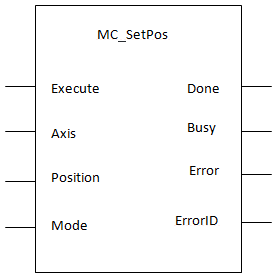
For more detail on how inputs and outputs work, refer to PLCopenA vendor -and product- independent worldwide association active in Industrial Control and aiming at standardizing PLC file formats based on XML FunctionA function calculates a result according to the current value of its inputs. A function has no internal data and is not linked to declared instances. Blocks - General Rules.
| Execute | Description | Requests to change the axis position |
| Data type | BOOL | |
| Range | 0,1 | |
| Unit | n/a | |
| Default | — | |
| Axis | Description | Name of a declared instance of the AXIS_REF library function. For more details Modify PLCopen Axis. |
| Data type | AXIS_REF Structure | |
| Range | [1,256] | |
| Unit | n/a | |
| Default | — | |
| Position | Description | Absolute Mode: New Axis Position to replace the present position. Relative Mode: Position offset to apply to present position (typically used with multiturn absolute position feedback devices). |
| Data type | LREAL | |
| Range | — | |
| Unit | n/a | |
| Default | — | |
| Mode | Description | LOW = Position input is an absolute position HIGH = Position input is a relative position |
| Data type | BOOL | |
| Range | — | |
| Unit | n/a | |
| Default | — |
| Done | Description | Indicates the reference move and position adjustment is complete |
| Data type | BOOL | |
| Busy | Description | Indicates this function block is executing |
| Data type | BOOL | |
| Error | Description | Indicates an invalid input, or the move was terminated due to an error |
| Data type | BOOL | |
| ErrorID | Description | Indicates the error if the Error output is high See table in PLCopen Function Block ErrorID Output |
| Data type | INT |
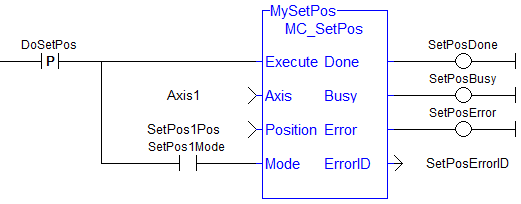
(* MC_SetPos ST"Structured text"
A high-level language that is block structured and syntactically resembles Pascal example *)
Inst_MC_SetPos ( Axis1 , 0, 0 );
//Inst_MC_SetPos is an instance of MC_SetPos function

(* MC_SetPos absolute mode example: Set position value to zero. *)
Inst_MC_SetPos ( Axis1 , 0, 0 );
//Inst_MC_SetPos is an instance of MC_SetPos function

(* MC_SetPos relative mode example: Increase position value by 1000. *)
Inst_MC_SetPos ( Axis1 , 1000, 1 );
//Inst_MC_SetPos is an instance of MC_SetPos function
|
Stay Connected with Kollmorgen       
|
Copyright © 2015 Kollmorgen™ |

|
 [Top]
[Top]