 MC_TouchProbe
 MC_TouchProbe
When the Execute input transitions from low to high, the control requests the drive to arm its Fast Input to latch the axis position when a Fast Input occurs. The Axis input specifies which axis's position to latch and the TriggerInput input specifies which Fast Input to use and whether to trigger on the rising or falling edge of the Fast Input. When the Fast Input event occurs, the drive latches the axis's position. This function block then returns the latched position at the RecordedPosition output and set the Done output high. This process can be canceled with the AbortTrigger function block.
If the WindowOnly input is high, the FirstPosition input and the LastPosition input define a window in which a Fast Input is accepted. Any Fast Input events that occur outside the window is ignored.
If First Position ≤ LastPosition, the window in which a Fast Input is accepted is:
FastInputPosition ≥ FirstPosition AND FastInputPosition ≤ LastPosition.

If First Position > LastPosition, the window in which a Fast Input is accepted is:
FastInputPosition >= FirstPosition OR FastInputPosition <= LastPosition.

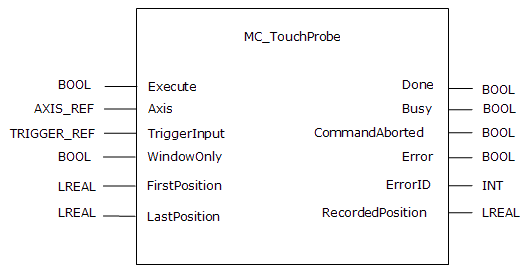
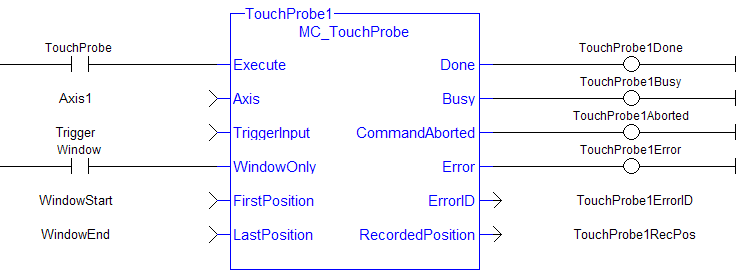
The following figure shows the ladder diagram view of the MC_TouchProbe function block:
The accuracy of captured position data depends on the travel velocity. Please see the article MC_TouchProbe and Time-Based Capture on KDN for more information and how to correct for timing.
To use Capture Engine 1 modify the input PDOs that are used and add the LatchThe control word is used to activate the drive's latch status machine. The latch control word is processed independently of the EtherCAT bus cycle. The status word is used to return the drive's latch status Position 1 parameter.
When using position-based capture, the proper Capture Mode and FB Source may need to be set up in the drive. One place to do that is in the Position Capture Screen in the KAS IDE"Integrated development environment"
An integrated development environment is a type of computer software that assists computer programmers in developing software.
IDEs normally consist of a source code editor, a compiler and/or interpreter, build-automation tools, and a debugger embedded WorkBench: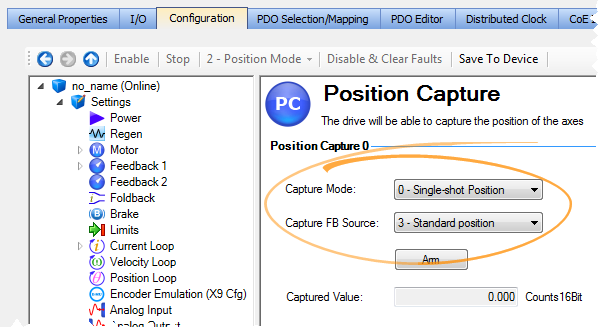
When setting up Position Capture, check the CoE-Init Command settings shown below. This is to verify they do not overwrite the corresponding drive parameters with unwanted values when the EtherCATEtherCAT is an open, high-performance Ethernet-based fieldbus system. The development goal of EtherCAT was to apply Ethernet to automation applications which require short data update times (also called cycle times) with low communication jitter (for synchronization purposes) and low hardware costs network initializes.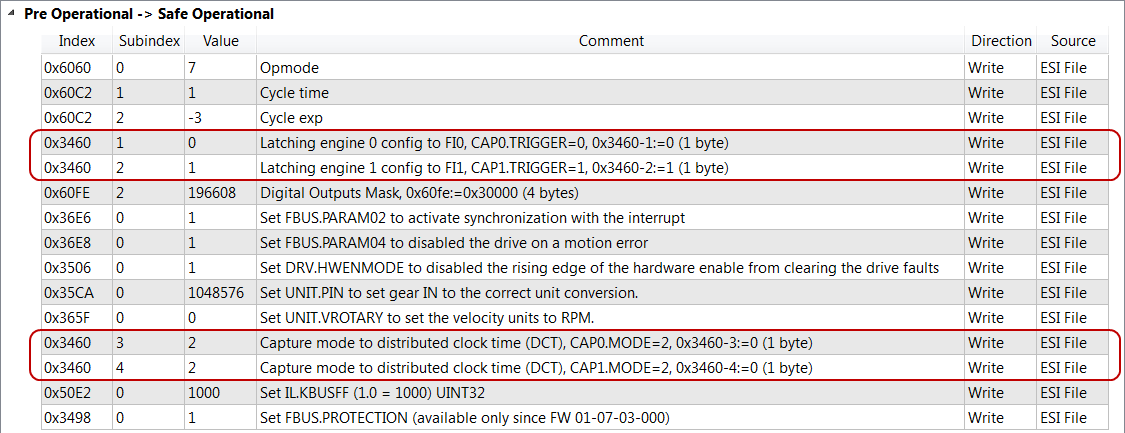
For more detail on how inputs and outputs work, refer to PLCopen Function Blocks - General Rules
| Execute | Description | Enables execution |
| Data type | BOOL | |
| Range | 0, 1 | |
| Unit | n/a | |
| Default | — | |
| Axis | Description | Selects the axis for which the position is latched |
| Data type | AXIS_REF | |
| Range | [1,256] | |
| Unit | n/a | |
| Default | — | |
| TriggerInput | Description |
Sets up the mechanism for the capture input signal. |
| Data type | TRIGGER_REF - an instance of the TRIGGER_REF reference function must first be setup in the Project Dictionary, as seen here.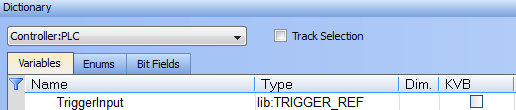 |
|
| Elements |
Capture Engine (drive capture engine to be used) INT TriggerInput.InputID 0 = Capture Engine 0 1 = Capture Engine 1 Range is [0,1] For information on configuring the capture engines, refer to AKD Capture Engine Configuration.
Trigger Direction (input signal’s edge to capture) INT TriggerInput.Direction 2 = falling edge Range is [1,2]
Axis Number (where input comes from) INT TriggerInput.TrigID 0 = trigger axis is to be the same as Axis.AXIS_NUM. Range is [0,256]
Trigger Mode (capture method) INT TriggerInput.TrigMode 0 = time based capture 1 = position based capture. For position based capture the TrigID must be the same as the Axis_Ref. Range is [0,1] |
|
| Unit | n/a | |
| Default | — | |
| WindowOnly | Description | Enables a position latching window. When this input is set, a window is defined by the FirstPosition and LastPosition inputs. Any Fast Input event that occurs outside the window is ignored. The first Fast Input event that occurs within the window latches the axis position |
| Data type | BOOL | |
| Range | — | |
| Unit | n/a | |
| Default | — | |
| FirstPosition | Description | See the function block Description above for an explanation of how this input and the LastPosition input define the window. This input is only applicable when the WindowOnly input is high. If the WindowOnly input is low, this input is ignored |
| Data type | LREAL | |
| Range | — | |
| Unit | User unit | |
| Default | — | |
| LastPosition | Description | See the function block Description above for an explanation of how this input and the FirstPosition input define the window. This input is only applicable when the WindowOnly input is high. If the WindowOnly input is low, this input is ignored |
| Data type | LREAL | |
| Range | — | |
| Unit | User unit | |
| Default | — |
| Done | Description | Function block has completed and the RecordedPosition output is valid |
| Data type | BOOL | |
| Busy | Description | Indicates that the specified input is arming or is armed, and waiting for the trigger and recording of the position to occur |
| Data type | BOOL | |
| CommandAborted | Description | A TriggerAbort function block has executed and canceled this function |
| Data type | BOOL | |
| Error | Description |
The function block has not completed successfully due to an error. The ErrorID output indicates the type of error
|
| Data type | BOOL | |
| ErrorID | Description | When the Error output is high, this output indicates the type of error. When the Error output is low, this output is undefined |
| Data type | INT | |
| RecordedPosition | Description | When the Done output goes high, this output returns the latched position. When the Done output is low, this output is undefined |
| Data type | LREAL | |
| Unit | User unit |
This function block can be used to:
|
(* MC_TouchProbe ST example *) TriggerInputRef.InputID := 1; //configure InputID TriggerInputRef.Direction := 1; //configure Direction TriggerInputRef.TrigID := 0; //configure TrigID TriggerInputRef.TrigMode := 0; //Capture trigger based on distributed clock time Inst_MC_TouchProbe( ArmProbe, Axis1, TriggerInputRef, FALSE,0.0, 0.0 ); //Inst_MC_TouchProbe is an instance of MC_TouchProbe function block ProbeIsDone := Inst_MC_TouchProbe.Done; //store Done output into a user defined variable ProbeValue := Inst_MC_TouchProbe.RecordedPosition; //store RecordedPosition output into a user defined variable |
|
Stay Connected with Kollmorgen       
|
Copyright © 2015 Kollmorgen™ |

|
 [Top]
[Top]