The KAS software includes two main software components, the IDE"Integrated development environment" An integrated development environment is a type of computer software that assists computer programmers in developing software. IDEs normally consist of a source code editor, a compiler and/or interpreter, build-automation tools, and a debugger and the RuntimeIn computer science, runtime (or run-time) describes the operation of a computer program, the duration of its execution, from beginning to termination (compare compile time). Within KAS, runtime also refers to the virtual machine that manage the program written in a computer language while it is running. The IDE resides on your PCPersonal Computer and the Runtime resides on your programmable automation controller or programmable drive. For optimum operation, the IDE you install and run on your PC must be compatible with the Runtime you install on your controller or programmable drive.
The KAS installer and PDMM or PCMM Runtime contain the version information in the filename:
KAS-Setup-2.12.0.60001.exe
KAS-PCMM-M-M1EC-2.12.0.60001.img
KAS-PCMM-M-MCEC-2.12.0.60001.img
KAS-PDMM-M-M1EC-2.12.0.60001.img
KAS-PDMM-M-MCEC-2.12.0.60001.img
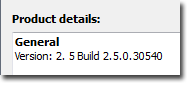
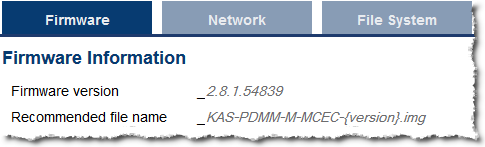
The version can be determined by the following:
| Version Source | Found From | Example |
|---|---|---|
| IDE, Controller or Simulator | Help menu > About |
|
| PDMM | Web server Settings Firmware tab |
|
The compatibility between the IDE and the Runtime is defined by matching the digits in the versions. The IDE and Runtime use the same version scheme:
major . minor . micro . revision
Examples
| IDE | Runtime | Compatible? | IDE to Runtime Connection |
|---|---|---|---|
| 2.12.xx.xxxx | 1.2.xx.xxxx | NO, No connection. | The IDE displays an error message. |
| 2.12.0.xxxx | 2.12.1.xxxx | YES* | Connection possible. The IDE displays warning and requires user to press “ok” to continue. |
| 2.12.0.xxxx | 2.12.0.xxxx | YES | Normal connection. |
| 2.12.0.30540 | 2.12.0.30540 | YES | Normal connection. |
* Not a recommended configuration. The IDE will operate, but there can be different features available between the IDE and the Runtime. It is recommended to upgrade either the IDE or the Runtime to matching versions.
|
Stay Connected with Kollmorgen       
|
Copyright © 2015 Kollmorgen™ |

|