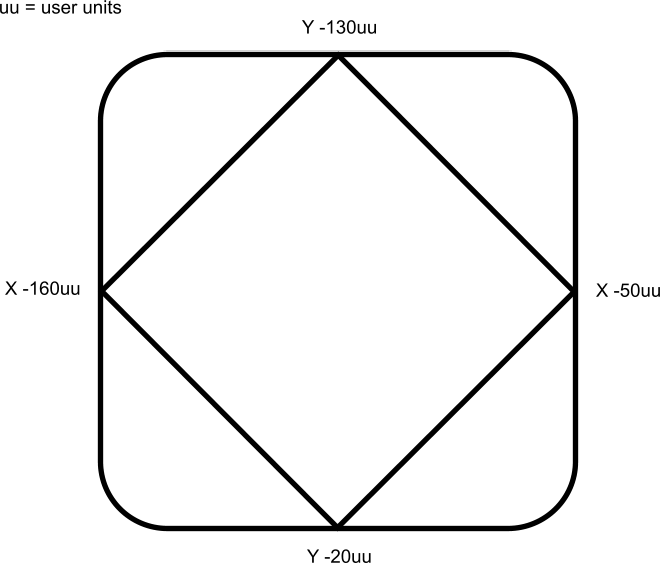
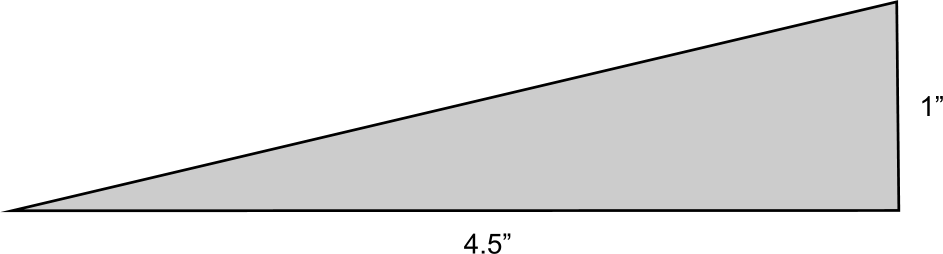
This project template controls three axes in coordinated motion (PLCOpenAxis1, PLCOpenAxis2 and PLCOpenAxis3) and demonstrates how to use 3D coordinated motion, transitions, blending and a homing cycle with PLCopenA vendor -and product- independent worldwide association active in Industrial Control and aiming at standardizing PLC file formats based on XML axes. The path follows a square and diamond pattern on a plane which is rotated ~12.5 degrees about the Y axis with the center of rotation located at Z=30 X=-160.
The pattern and the platform for the plane are displayed below.
There is a video which illustrates the motion. Click on the image below to open the video in its own window.
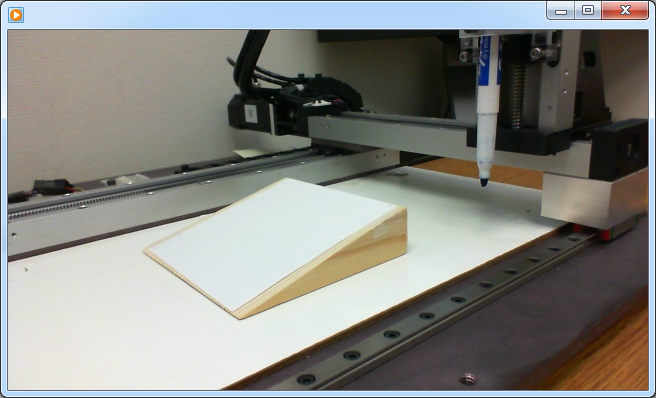
This program was designed to run on the 3-Axis Demonstration machine shown in the video. It uses the machine’s physical end-limit switches for the homing sequence. To run this program on different hardware, click on the Sim Mode button on the Control Panel. This will cause the program to execute in simulator mode, which will bypass the homing sequence. Also, the axis scaling parameters (entered in the PLCopen Axis Data dialogs) may need to be changed to accommodate the different hardware.
The Coordinated Motion 3-Axis template has a Sequential Function Chart (SFC"Sequential function chart" It can be used to program processes that can be split into steps. The main components of SFC are: - Steps with associated actions - Transitions with associated logic conditions - Directed links between steps and transitions) program containing both Structured Text (ST"Structured text" A high-level language that is block structured and syntactically resembles Pascal) and Free Form Ladder Diagram (FFLD).
This program provides examples of coordinated motion linear moves, transitions, blending, and a homing cycle.
To run the complete motion pattern:
| # | Description |
|---|---|

|
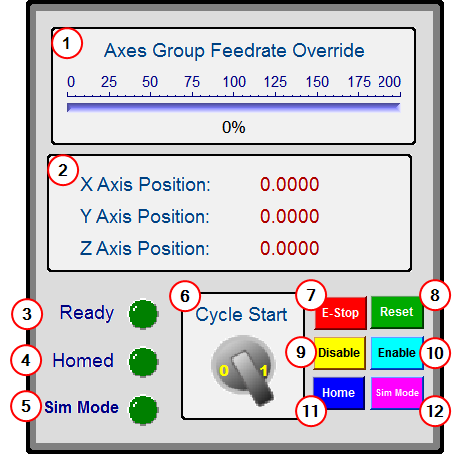
Allows you to change the coordinated motion feedrate from 0% to 200% |

|
Displays the axis positions |

|
Ready Indicator light - "Ready" indicates that the three axes are enabled, and the axes group is ready and enabled for coordinated motion. |

|
Homed Indicator light: "Homed" indicates that each axis has been referenced, and the axis group has moved to its zero position. |

|
Simulation Mode indicator light: "Sim Mode" indicates that the homing functions have been bypassed and the program is set up as if the homing function has been performed. |

|
Begins the coordinated motion pattern. "Ready" and "Homed" lights must both be on to execute motion. |

|
Causes an Emergency Stop for all axes. The axes will be disabled. "Ready" and "Homed" lights will be turned off. |

|
Resets the Emergency Stop and clears axis errors. |

|
Disables the axes group. The axes have to be at standstill to disable the group |

|
Enables the three axes and the axes group. This will turn on the "Ready" light. |

|
Starts a homing function. Each axis will be referenced and the axis group will move to its zero position. HomingThe Homing procedure allows, based on a position measurement, to set a position offset to the motor in order to ensure it is physically at the home position must be completed before executing a cycle start. When homing is complete, the "Homed" light will be turned on. |

|
"Sim Mode" bypasses the homing function. The current position of each axis will be set to zero position. The homing function will not be performed. The "Sim Mode" light and "Homed" light will be turned on. This mode can be used when running on a simulator or when the hardware reference switches are not available. |
|
Stay Connected with Kollmorgen       
|
Copyright © 2015 Kollmorgen™ |

|