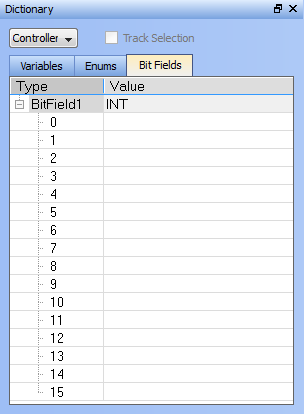
 A bit field packs multiple pieces of data together in one variable. Each field represents one piece of data. Each piece of data should have no dependency upon other fields. Bit Fields are used to define custom variable types and values.
A bit field packs multiple pieces of data together in one variable. Each field represents one piece of data. Each piece of data should have no dependency upon other fields. Bit Fields are used to define custom variable types and values.
A Bit Field may be created in one of three ways:
This creates a default Bit Field labelled as "BitFieldn" with a Value type "INT".
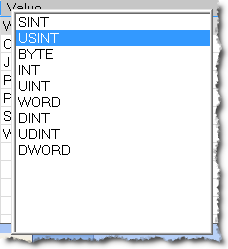
Once the Type is defined you may populate the bits.
To save your changes you must press Enter, Tab, the Up, or the Down arrow key.
Bit Fields are supported over MODBUSModBus is a serial communications protocol and is now the most commonly available means of connecting industrial electronic devices.
ModBus is often used to connect a supervisory computer with a remote terminal unit in supervisory control and data acquisition (SCADA) systems.
Versions of the ModBus protocol exist for serial port and Ethernet (it is widely used with TCP/IP over Ethernet). Below is a variable with a custom Type defined in the Bit Fields list which is flagged for KVB. It will be exported.to MODBUS.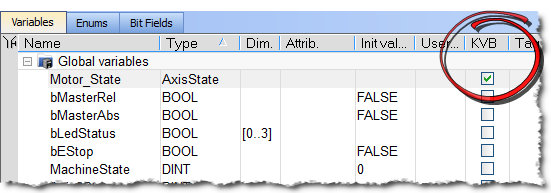
Following is an example of setting up and testing a Bit Fields entry.
Here we have defined a bit called AxisState with four values.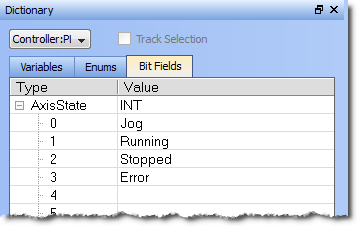
Here we have defined a variable called Motor_State. We selected the AxisState type from the dropdown menu.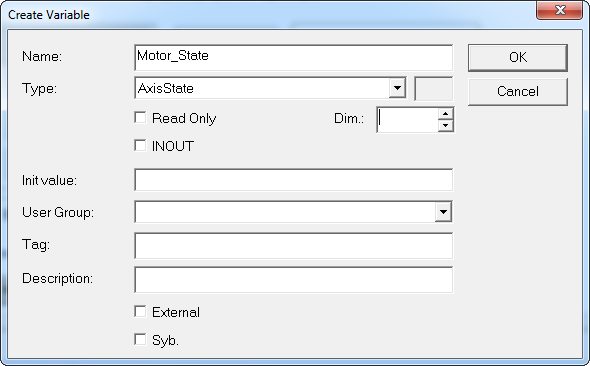
VariableName.BitName in any editor.Here we are using the Structured Text editor and typed "motor_state." When the dot was typed the selector opened, showing us the available bits for the variable.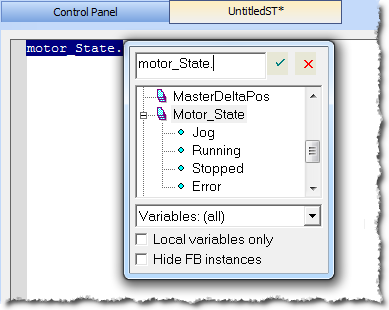
|
Stay Connected with Kollmorgen       
|
Copyright © 2015 Kollmorgen™ |

|