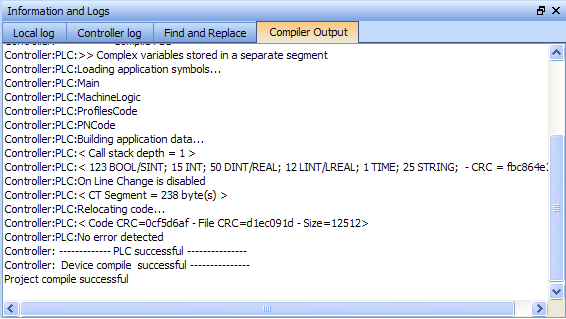
This tab displays information about the last project compilation. It shows information messages as well as Warnings and Errors (highlighted in red). Successful and unsuccessful output is reported within this tab to help identify and troubleshoot problem areas of the program development.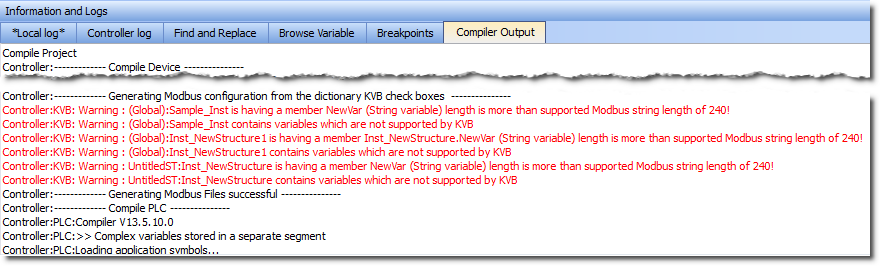
Double-click an error to open the program in the workspace and jump directly to the relevant location in the editor. This lets you rework the program and fix the error.
In the image above, the first warning is for Sample_Inst. Double clicking that item opens that item's location in the Dictionary.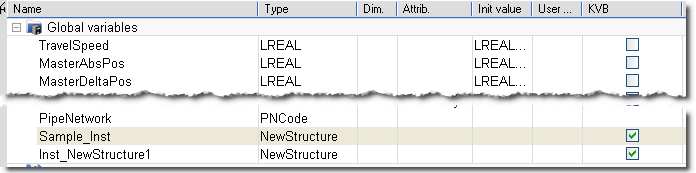
When there is a long list of statements, only the bottom part is displayed. Do not forget to scroll up.
 How to Clean-up the Code?
To clean-up your application, do as follows:
Because fixing one piece of code can eliminate multiple compiler output error, it is recommended to recompile each time you correct an error.
When no more errors exist, the following messages are displayed:
Text displayed:
Operands of "*" or "/" must be numbers and have the same type
Meaning:
This error appears in a ST"Structured text" A high-level language that is block structured and syntactically resembles Pascal instruction when a constant does not have the expected type in a multiplication or division operation. Typically, REAL is the default precision for floating points, so you have to explicitly declare your long real constants with the LREAL# prefix when required.
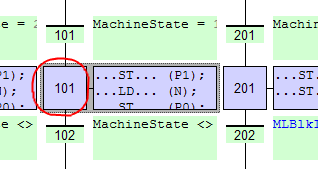
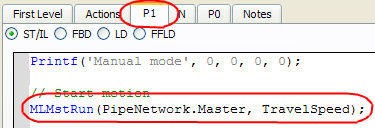
How to Understand the Location Details — SFC Programs

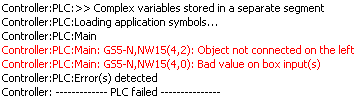
 How to Understand the Location Details — FFLD Programs
FFLD Location details
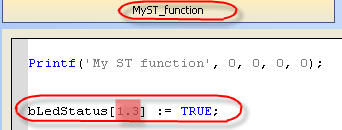
 How to Understand the Location Details — ST Programs
ST Location details

|
Stay Connected with Kollmorgen       
|
Copyright © 2015 Kollmorgen™ |

|