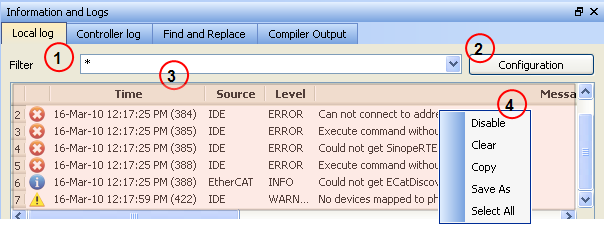
Log messages are an important source of information when you are troubleshooting with KAS IDE"Integrated development environment"
An integrated development environment is a type of computer software that assists computer programmers in developing software.
IDEs normally consist of a source code editor, a compiler and/or interpreter, build-automation tools, and a debugger.
When reporting an issue to Support, copy/paste the logs in your report.
Log messages are displayed on two tabs, Local log and Controller log.
Based on the configuration settings  )
)
The Configuration button is only available on the Controller log tab when the IDE is connected to a controller.
Every log message in the table widget 
|
Field |
Description |
|
Time |
Time when the log was recorded with the format:
|
|
Identifies a software or hardware component issuing the messages. Each source is configured with a specific Level.
|
|
|
Each message has one of the following levels with importance in ascending order:
|
|
|
Message |
Text of the message issued from the source
|
Table 3-22: Log Messages - List of Fields
The table contains a contextual menu  )
)
|
Command |
Description |
|
DisableRemoval of the ENABLE signal. Disables power stage./ |
You can stop the log recording at any time, so that no more messages are added
|
|
Clear |
Empty the list by erasing all the messages already recorded
|
|
Copy |
Copy the text of the selected messages to the clipboard (you can perform multi-selection with the Ctrl or Shift keys)
|
|
Save As |
Save all the messages in a log file
|
|
Select All |
Select all the messages that are displayed in the table
|
Table 3-23: Log Messages - List of Buttons
|
Stay Connected with Kollmorgen       
|
Copyright © 2015 Kollmorgen™ |

|