Power Rails
Contacts and Coils
Operations,
Functions and Function blocks,
represented by rectangular blocks
Labels and
Jumps
Use of ST instructions in graphic languages
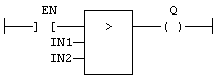
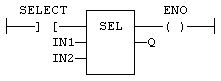
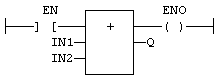
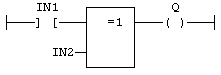
The rung state in a FFLD diagram is always Boolean. Blocks are connected to the rung with their first input and output. This implies that special "EN" and "ENO" input and output are added to the block if its first input or output is not Boolean.
The "EN" input is a condition. It means that the operation represented by the block is not performed if the rung state (EN) is FALSE. The "ENO" output always represents the sane status as the "EN" input: the rung state is not modified by a block having an ENO output.
(* First input is the rung. The rung is the output *)
(* The comparison is executed only if EN is TRUE *)
(* the input rung is the selector *)
(* ENO has the same value as SELECT *)
(* The addition is executed only if EN is TRUE *)
(* ENO is equal to EN *)
Free Form Ladder Diagram (FFLD) Editor
FFLD Editor Keyboard Shortcuts
|
Stay Connected with Kollmorgen       
|
Copyright © 2015 Kollmorgen™ |

|