 MC_CamTblSelect
 MC_CamTblSelect
For more detail on how inputs and outputs work, refer to PLCopen Function Blocks - General Rules
| Execute |
Description |
Requests to queue the slave gear ratio move |
|
Data type |
BOOL |
|
|
Range |
0, 1 |
|
|
Unit |
n/a |
|
|
Default |
— |
|
| CamTable |
Description |
Profile name as defined in the CAM Profile Properties dialog |
|
Data type |
STRING |
|
|
Range |
— |
|
|
Unit |
n/a |
|
|
Default |
— |
|
| Periodic |
Description |
Selects if the profile is periodic |
|
Data type |
BOOL |
|
|
Range |
0, 1 |
|
|
Unit |
n/a |
|
|
Default |
— |
|
| MasterAbsolute |
Description |
Selects if master profile is absolute or relative |
|
Data type |
BOOL |
|
|
Range |
0, 1 |
|
|
Unit |
n/a |
|
|
Default |
— |
|
| SlaveAbsolute |
Description |
Selects if Slave profile is absolute or relative |
|
Data type |
BOOL |
|
|
Range |
0, 1 |
|
|
Unit |
n/a |
|
|
Default |
— |
| Done |
Description |
Indicates the function block has completed successfully |
|
Data type |
BOOL |
|
|
Range |
0, 1 |
|
|
Unit |
n/a |
|
| Busy |
Description |
Indicates this function block is executing |
|
Data type |
BOOL |
|
|
Range |
0, 1 |
|
|
Unit |
n/a |
|
| Error |
Description |
Indicates an invalid input was specified |
|
Data type |
BOOL |
|
|
Range |
0, 1 |
|
|
Unit |
n/a |
|
| ErrorID |
Description |
Indicates the error if the Error output is high
|
|
Data type |
INT |
|
|
Range |
— |
|
|
Unit |
n/a |
|
| CamTableID |
Description |
Indicates the ID number of the profile to be used with MC_CamIn |
|
Data type |
INT |
|
|
Range |
0 - 255 |
|
|
Unit |
n/a |
22 (Too Many Profiles). It is only necessary to call MC_CamTblSelect once for each Profile/Periodic/MasterAbsolute/SlaveAbsolute configuration to be used.If the master axis moves back into the profile range, the slave resumes following the profile.
If the SlaveAbsolute input is set to TRUE, the axis jumps back to the starting position. If you set this input to FALSE, the axis will no longer jump back; but rather, as the profile repeats, the slave moves relative to the start of each period.
      (* MC_CamTblSelect ST example *) //call this function block every scan until "Done"

Inst_MC_CamTblSelect(DoSelect, 'Profileb', TRUE, TRUE, TRUE ); //Inst_MC_CamTblSelect is instance of MC_CamTblSelect
CamSelDone := Inst_MC_CamTblSelect.Done;  //store Done output to user defined variable
IF CamSelDone = TRUE THEN//when function block is "done" store
CamTableID := Inst_MC_CamTblSelect.CamTableID;  //CamTableID in user defined variable
END_IF;
See also how this function is used in the Hole punch project here
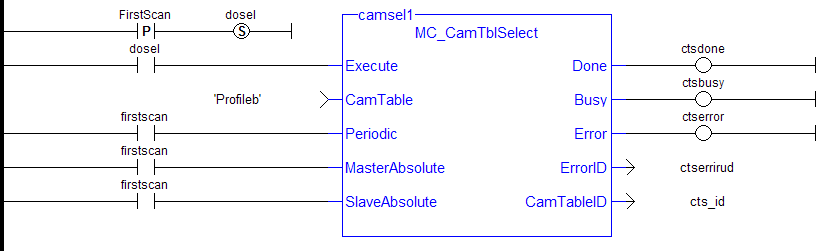
See also MC_CamIn for examples.
|
Stay Connected with Kollmorgen       
|
Copyright © 2015 Kollmorgen™ |

|
 See Also
 [Top]
[Top]