 PrintMessage
 PrintMessage
The PrintMessage block is used to generate a log message with any wanted strings in the Log Messages window.
PrintMessage use the PLC"Programmable Logic Controller" A Programmable Logic Controller, PLC, or Programmable Controller is a digital computer used for automation of industrial processes, such as control of machinery on factory assembly lines. Used to synchronize the flow of inputs from (physical) sensors and events with the flow of outputs to actuators and events message type. So, to display all messages generated by PrintMessage, go to the log configuration and select the DEBUG level for the PLC source.
The message could be sent with a logging level from 0 to 4 that qualifies its importance. The highest level, 4, logs critical messages (available levels are: debug, informational, warning, error and Critical).
Keep in mind that only Error and Critical messages a generated by default. If you want to force the system to generate every message level, go into the log configuration and change the settings to the desired level.
Enabling all messages can slow down the application's execution. To avoid locking up communications between the IDE"Integrated development environment" An integrated development environment is a type of computer software that assists computer programmers in developing software. IDEs normally consist of a source code editor, a compiler and/or interpreter, build-automation tools, and a debugger and RuntimeIn computer science, runtime (or run-time) describes the operation of a computer program, the duration of its execution, from beginning to termination (compare compile time). Within KAS, runtime also refers to the virtual machine that manage the program written in a computer language while it is running, you must never include a print statement in your program that prints to the log every update cycle.
See at the configuration settings for more details.
| Level | Description | Level of the logged message. In other words, the importance of it. Keep in mind that not all messages are displayed in the log windows by default. Only Error and Critical messages a displayed. So, in order to show lower level, it is needed to change the log settings. PrintMessage logs PLC messages. |
| Data type | DINT | |
| Range |
[0 , 4] Defines are: LEVEL_DEBUG, LEVEL_INFO, LEVEL_WARNING, LEVEL_ERROR, LEVEL_CRITICAL |
|
| Unit | n/a | |
| Default | — | |
| Message | Description | Content of the message. A string of 255 characters maximum. |
| Data type | String | |
| Range | 1 to 255 characters | |
| Unit | n/a | |
| Default | — |
|
Default (.Q) |
Description | Returns true when function successfully executes See more details here |
| Data type | BOOL | |
| Unit | n/a |
PrintMessage( LEVEL_DEBUG, 'Message string to be logged' );
// It's possible to create a temporary variable with the message.
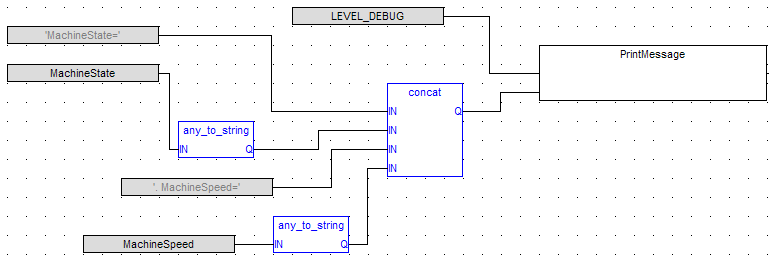
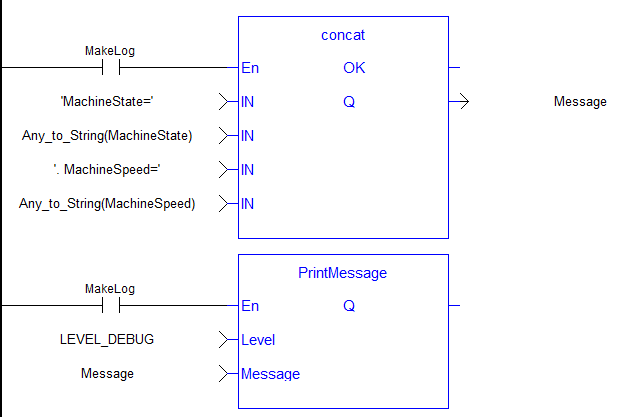
MESSAGE := CONCAT( 'MachineState=', ANY_TO_STRING(MachineState), '. MachineSpeed=', ANY_TO_STRING(MachineSpeed) );

// Then print the message to the log window
PrintMessage( LEVEL_INFO,     MESSAGE );
PrintMessage( LEVEL_WARNING,  MESSAGE );
PrintMessage( LEVEL_ERROR,    MESSAGE );

// Or to create the string directly in the function call:
PrintMessage( LEVEL_CRITICAL, CONCAT( 'MachineState=', ANY_TO_STRING(MachineState), '. MachineSpeed=', ANY_TO_STRING(MachineSpeed) ) );
|
Stay Connected with Kollmorgen       
|
Copyright © 2015 Kollmorgen™ |

|
 [Top]
[Top]