 MLSyncInit
|
Name |
Description |
Return type |
|
Initializes a synchronizer Pipe Block |
BOOL |
|
|
None |
||
|
Starts a synchronization of a synchronizer Pipe Block |
BOOL |
|
|
De-synchronizes a synchronizer Pipe Block |
BOOL |
|
|
Sets the output phasing value of a synchronizer block |
BOOL |
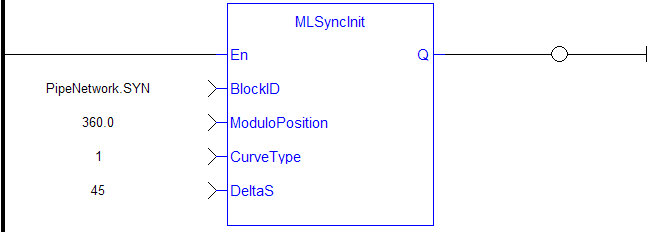
MLSyncInitInitializes a synchronizer Pipe Block. Returns TRUE if the function succeeded.
This FB is automatically created in the compiled code of a Pipe Network.
This function block is part of the MLPN_CREATE_OBJECT to initialize the Pipe Network. It is called at the beginning of an application program with the function call:
|
PipeNetwork(MLPN_CREATE_OBJECTS); |
|
BLockID |
Description |
Name of the Pipe Network Block |
|
Data type |
DINT |
|
|
Range |
[-2147483648, 2147483648] |
|
|
Unit |
n/a |
|
|
Default |
— |
|
|
ModuloPosition |
Description |
The modulo distance |
|
Data type |
LREAL |
|
|
Range |
— |
|
|
Unit |
User unit |
|
|
Default |
— |
|
|
CurveType |
Description |
The curve type to the motion when starting and stopping synchronization. Option are Parabolic or Polynomial |
|
Data type |
DINT |
|
|
Range |
[1 , 2] (1 = Parabolic, 2 = Polynomial) |
|
|
Unit |
n/a |
|
|
Default |
— |
|
|
DeltaS |
Description |
The Distance to get in or out of synchronization. This parameter is used in the MLSyncStart and MLSyncStop FunctionBlocks |
|
Data type |
LREAL |
|
|
Range |
— |
|
|
Unit |
User unit |
|
|
Default |
— |
|
Default (.Q) |
Description |
Function BlockA function block groups an algorithm and a set of private data. It has inputs and outputs. Execute Successfully See more details here |
|
Data type |
BOOL |
|
|
Unit |
n/a |
//Initialize  a synchronizer  Pipe Block named “ SYN” with a modulo of 360, Curve Type of Parabolic, and a distance (DeltaS) of 30 to get in and out of synchronization
MLSyncInit( PipeNetwork.SYN, 360, 1, 30 );

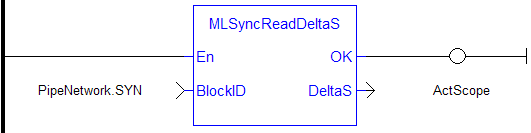
MLSyncReadDeltaSGets the output phasing value of a synchronizer block. Output phasing is the distance or the slope the output takes to synchronize with the input when MLSyncStart Block is executed (see Get Output Phasing after MLSyncStart). It also affects the distance or the slope the output takes to desynchronize with the input and come to a stop when MLSyncStop Block is executed (see Get Output Phasing after MLSyncStop).
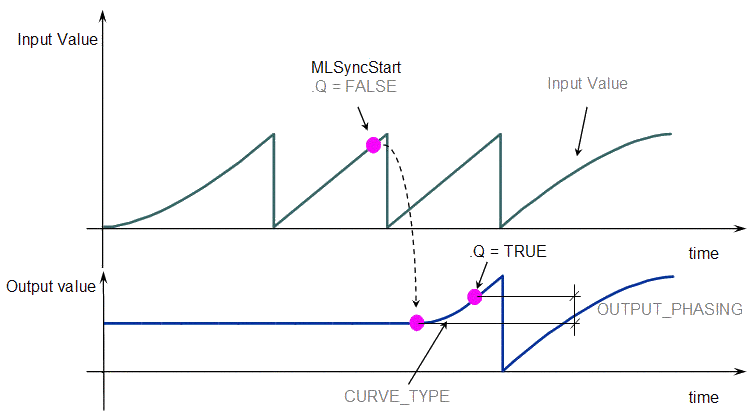
Figure 11-101: Get Output Phasing after MLSyncStart
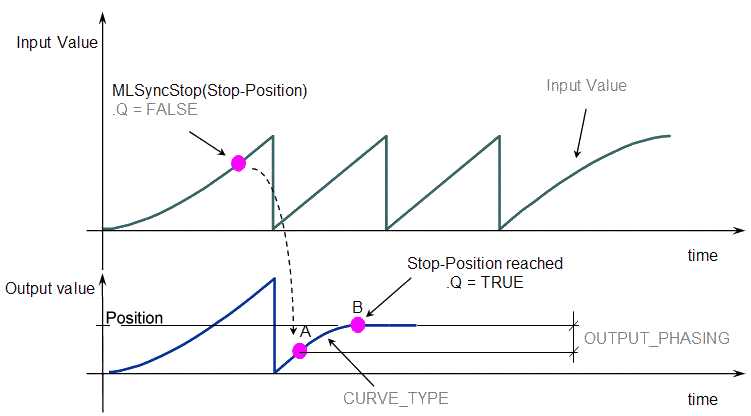
Figure 11-102: Get Output Phasing after MLSyncStop
|
BlockID |
Description |
Name of the Pipe Network Block |
|
Data type |
DINT |
|
|
Range |
[-2147483648, 2147483648] |
|
|
Unit |
n/a |
|
|
Default |
— |
|
DeltaS |
Description |
Present Delta Slope value |
|
Data type |
LREAL |
|
|
Unit |
User unit |
|
ActScope := MLSyncReadDeltaS( PipeNetwork.SYN );
|

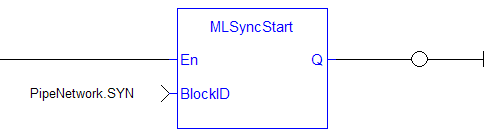
MLSyncStartStart a synchronization of a synchronizer Pipe Block. Returns TRUE if the function succeeded.
|
BLockID |
Description |
Name of the Pipe Network Block |
|
Data type |
DINT |
|
|
Range |
[-2147483648, 2147483648] |
|
|
Unit |
n/a |
|
|
Default |
— |
|
Default (.Q) |
Description |
FunctionA function calculates a result according to the current value of its inputs. A function has no internal data and is not linked to declared instances. Block Execute Successfully See more details here |
|
Data type |
BOOL |
|
|
Unit |
n/a |
|
MLSyncStart( PipeNetwork.SYN );
|

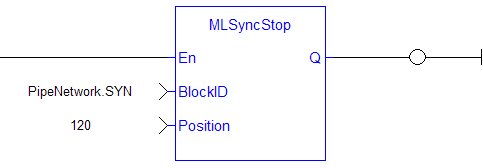
MLSyncStopDe-synchronizes a synchronizer Pipe Block. Returns TRUE if the function succeeded.
|
Position |
Description |
Motion Stop Position |
|
Data type |
LREAL |
|
|
Range |
— |
|
|
Unit |
User unit |
|
|
Default |
— |
|
Default (.Q) |
Description |
Function Block Execute Successfully See more details here |
|
Data type |
BOOL |
|
|
Unit |
n/a |
|
MLSyncStop( PipeNetwork.SYN , 120 );
|

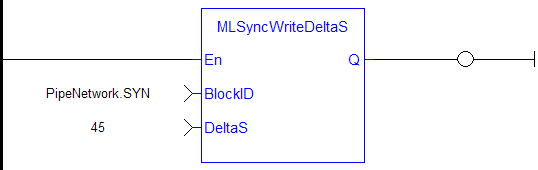
MLSyncWriteDeltaSSet the output phasing value of a synchronizer block. Returns TRUE if the function succeeded. Output phasing is the distance or the slope the output takes to synchronize with the input when MLSyncStart Block is executed. It also affects the distance or the slope the output takes to desynchronize with the input and come to a stop when MLSyncStop Block is executed.
Figure 11-105: Set output phasing after MLSyncStart
Figure 11-106: Set output phasing after MLSyncStop
|
BLockID |
Description |
Name of the Pipe Network Block |
|
Data type |
DINT |
|
|
Range |
[-2147483648, 2147483648] |
|
|
Unit |
n/a |
|
|
Default |
— |
|
|
DeltaS |
Description |
Slope to be used during Start and stop of Synchronization |
|
Data type |
LREAL |
|
|
Range |
— |
|
|
Unit |
User unit |
|
|
Default |
— |
|
Default (.Q) |
Description |
Function Block Execute Successfully See more details here |
|
Data type |
BOOL |
|
|
Unit |
n/a |
|
MLSyncWriteDeltaS( PipeNetwork.SYN, 45 );
|

When you call the MLSyncStop function, the output value is adapted according to the specified Stop-Position (point B).
The OUTPUT_PHASING parameter is used to define point A, where the flow follows a curve in order to smooth the output value.
When you call the MLSyncStart function, the output value is adapted to catch up with the input value.
The OUTPUT_PHASING parameter is also used to define a curve in order to smooth the output value.
Figure 11-107: Synchronizer Functions Usage
|
Stay Connected with Kollmorgen       
|
Copyright © 2015 Kollmorgen™ |

|
 [Top]
[Top]