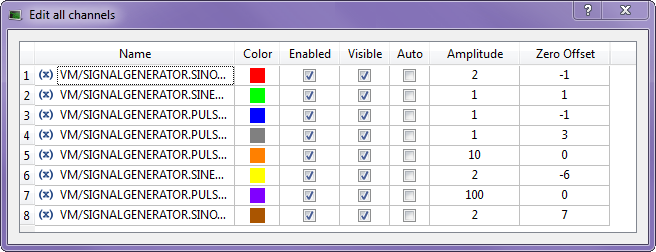
Figure 10-27: Edit all Channels
This dialog enables you to manage all the channels in the same view. For each channel, the following information is displayed:
Table 10-5: Scope - Channels Properties
If your application is not connected and running, the following message is displayed.
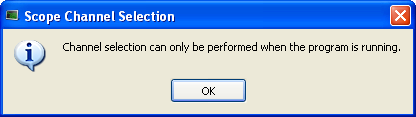
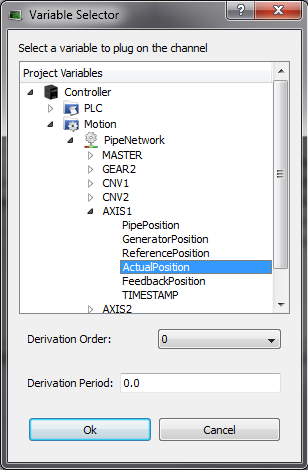
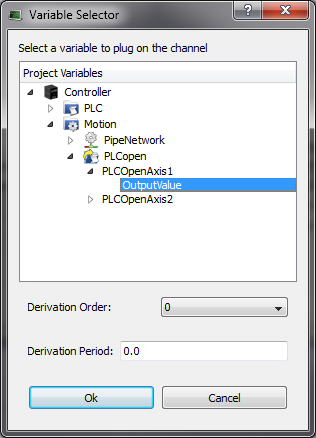
Figure 10-28: Scope - Variable Selector for Pipe Network and PLCopen
The Variable Selector contains only the PLC"Programmable Logic Controller" A Programmable Logic Controller, PLC, or Programmable Controller is a digital computer used for automation of industrial processes, such as control of machinery on factory assembly lines. Used to synchronize the flow of inputs from (physical) sensors and events with the flow of outputs to actuators and events variables that are eligible for the softscope (i.e. BOOL, INT, SINT, DINT, LINT, UINT, USINT, UDINT, ULINT, BYTE, WORD, DWORD, LWORD, TIME and LREAL, as long as they are not in a UDFB instance).
In addition, in simulated mode, only a subset of variables are displayed (e.g. ActualVelocity 1 The measured value is the instant velocity of the axis in RPM*1000. Note that you can see some oscillations because it is an instant velocity, not an average velocity. is not visible).
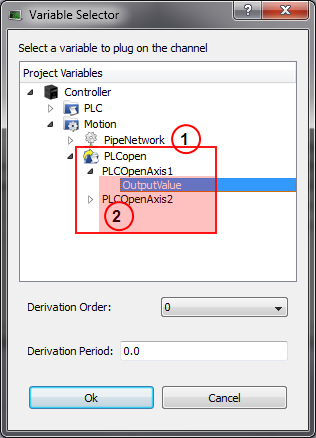
Figure 10-29: Scope - Variable Selector of an item in a array (see call out  ) which is part of a structure
For more details on:
- Axis pipe block positions, About Associated Data on Positions
- PLCopenA vendor -and product- independent worldwide association active in Industrial Control and aiming at standardizing PLC file formats based on XML Axis positions, Axis Positions Data
0.0 (no modulo) or the Modulo Period, e.g. 360.0.If the selected Derivation Order is greater than zero, the Derivation Period of the selected signal can be used to remove rollover spikes in the derivative value if the variable is of a periodic nature as the result of "modulo" behavior.
 Unplugging a probe
 [Top]
[Top]


