First generation AKD drives support one axis per drive, while AKD2G drives support two axes per drive. When configuring drives in the EtherCAT Devices tab, you will need to designate which motion axis applies to each "drive axis", which is the actual axis the drive controls.
For more details about AKD GUI"Graphical User Interface" A GUI is a type of user interface which allows people to interact with a computer and computer-controlled devices click here
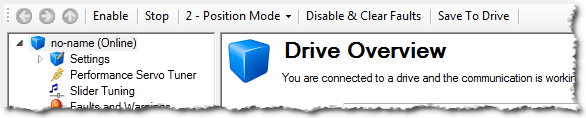
The toolbar provides access to the following:
Depending on the number of AKD drives physically present in the EtherCAT network, the KAS IDE"Integrated development environment"
An integrated development environment is a type of computer software that assists computer programmers in developing software.
IDEs normally consist of a source code editor, a compiler and/or interpreter, build-automation tools, and a debugger might slow down when getting data.
The KAS RuntimeIn computer science, runtime (or run-time) describes the operation of a computer program, the duration of its execution, from beginning to termination (compare compile time).
Within KAS, runtime also refers to the virtual machine that manage the program written in a computer language while it is running is not concerned with this limitation.
To stop all the AKD drives at the same time, click on the Stop button  in the Device Toolbar.
The status bar provides the following information on the drive:

For the SW and HW enable status indicators, the color code is:
|
Stay Connected with Kollmorgen       
|
Copyright © 2015 Kollmorgen™ |

|
 See Also