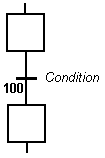
To change the number of a step, transition or jump, select it and hit Ctrl+ENTER keys.
The transition is marked by a small horizontal line that crosses a link drawn between the two steps.
The default direction for vertical links is from the top to the bottom
Transitions define the dynamic behavior of the SFC chart, according to the following rules:
When the same step is linked before and after the transition, it remains active (no pulse in its activity signal)
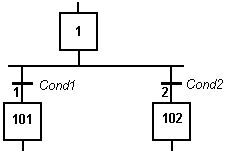
It is possible to link a step to several transitions and thus create a divergence. The divergence is represented by a horizontal line. Transitions after the divergence represent several possible changes in the situation of the program.
All conditions are considered as exclusive, according to a "left to right" priority order. It means that a transition is considered as FALSE if at least one of the transitions connected to the same divergence on its left side is TRUE.
Below is an example:
|
Transition 2 is crossed if: |
|
Stay Connected with Kollmorgen       
|
Copyright © 2015 Kollmorgen™ |

|