 MLAxisIsTrigged
Description
Checks if the axis got a trigger event. Returns TRUE if the Fast Input The inputs are taken into account at each cycle depending on the system periodicity (for example each millisecond). Under certain circumstances this can be insufficient when more accuracy is needed, or if a quick response is required from the system. To fill the gap, a drive may have some Fast Input connections (generally one or two). When an event happens that triggers a Fast Input (e.g. when a sensor sends a rising edge), the detection of a signal occurs faster (which can be 1000 times more accurate than the system periodicity). Then the timestamp associated with this input can be provided to the IPC to take corrective action event has been triggered and not yet been reset.
Arguments
Input
|
ID |
Description |
ID Name of the Axis block |
|
Data type |
DINT |
|
|
Range |
— |
|
|
Unit |
N/A |
|
|
Default |
— |
|
|
InputID |
Description |
ID of the triggered Fast input of an axis (ie IN1 and IN2 on S300 0 = Touch Probe 1 / Capture Engine 0 1 = Touch Probe 2 / Capture Engine 1 Range is [0,1] |
|
Data type |
DINT |
|
|
Range |
— |
|
|
Unit |
N/A |
|
|
Default |
— |
|
|
edge |
Description |
Configures the Inputs as 0= Disabled, 1=Rising Edge |
|
Data type |
DINT |
|
|
Range |
— |
|
|
Unit |
N/A |
|
|
Default |
— |
Output
|
Default (.Q) |
Description |
Returns true when function successfully executes. See more details here. |
|
Data type |
BOOL |
|
|
Unit |
N/A |
Related Functions
Example
Structured Text
|
MLAxisIsTrigged (PipeNetwork.Axis1, 0,1 ) ;
|
Ladder Diagram
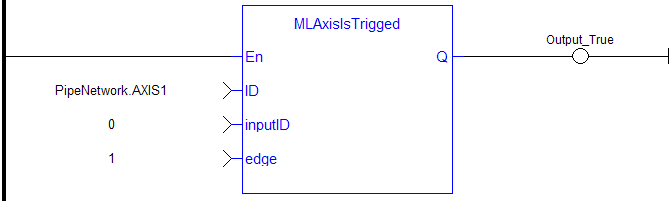
Function Block Diagram

 [Top]
[Top]


