 MC_MoveVelocity
Description
-
-
Consider using the MC_MoveContVel function block. It is more flexible and allows for the continuous update of motion parameters.
 See Also
Time Diagram
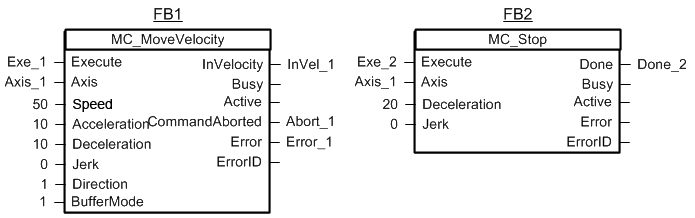
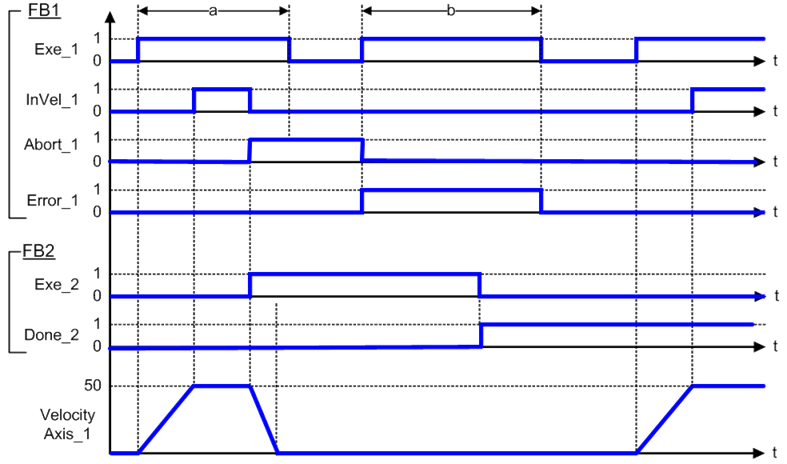
The example below shows the behavior of the combination of a MC_Stop FB with a MC_MoveVelocity FB.
- A rotating axis is ramped down with FB2 MC_Stop
- The axis rejects motion commands as long as MC_Stop parameter “Execute” = TRUE
FB1 MC_MoveVelocity reports an error indicating the busy MC_Stop command.
-
- This function block starts a motion-related action and therefore stores data for calculations and error checking. Please see Calling Function Blocks Multiple Times in the Same Cycle if you are using a dual-core controller.
Arguments
For more detail on how inputs and outputs work, refer to PLCopen Function Blocks - General Rules
Input
| Execute | Description | Requests to queue the move |
| Data type | BOOL | |
| Range | False, True | |
| Unit | N/A | |
| Default | — | |
| Axis | Description | Identifier of a declared instance of the AXIS_REF library function. For more details,see "About Axis Name and Number". |
| Data type | AXIS_REF | |
| Range | [1,256] | |
| Unit | N/A | |
| Default | — | |
| Speed | Description | The target axis speed. Direction is specified by the Direction input parameter. |
| Data type | LREAL | |
| Range | Positive values | |
| Unit | User unit/sec | |
| Default | — | |
| Acceleration | Description | Trapezoidal: Acceleration rate S-curve: Maximum acceleration |
| Data type | LREAL | |
| Range | Positive values | |
| Unit | User unit/sec2 | |
| Default | — | |
| Deceleration | Description | Trapezoidal: Deceleration rate S-curve: Unused |
| Data type | LREAL | |
| Range | Positive values | |
| Unit | User unit/sec2 | |
| Default | — | |
| JerkIn physics, jerk is the rate of change of acceleration; more precisely, the derivative of acceleration with respect to time
|
Description | Trapezoidal: 0 S-curve: Constant jerk In physics, jerk is the rate of change of acceleration; more precisely, the derivative of acceleration with respect to time |
| Data type | LREAL | |
| Range | — | |
| Unit | User unit/sec3 | |
| Default | — | |
| Direction | Description | A 0 or False value specifies that the axis should move in the positive direction. A 1 or True value specifies that the axis should move in the negative direction. |
| Data type | SINT | |
| Range | [0, 1] | |
| Unit | N/A | |
| Default | — | |
| BufferMode | Description | The specified buffer mode. For more information see "Buffer Modes". |
| Data type | SINT | |
| Range | MC_BUFFER_MODE_ABORTING MC_BUFFER_MODE_BUFFERED MC_BUFFER_MODE_BLENDING_PREVIOUS MC_BUFFER_MODE_BLENDING_NEXT MC_BUFFER_MODE_BLENDING_LOW MC_BUFFER_MODE_BLENDING_HIGH |
|
| Unit | N/A | |
| Default | — |
Output
| InVelocity | Description | Indicates the command velocity has reached the programmed velocity |
| Data type | BOOL | |
| Busy | Description | High from the moment the Execute input is one-shot to the time the move is ended |
| Data type | BOOL | |
| Active | Description | Indicates this move is the active move |
| Data type | BOOL | |
| CommandAborted | Description | Indicates the move was aborted |
| Data type | BOOL | |
| Error | Description | Indicates an invalid input was specified or the move was terminated due to an error |
| Data type | BOOL | |
| ErrorID | Description | Indicates the error if Error output is set to TRUE. See table in PLCopen Function Block ErrorID Output |
| Data type | INT |
Example
Structured Text
            (* MC_MoveVelocity ST example *)

Inst_MC_MoveVelocity( MovVelReq , Axis1, 200.0, 100.0, 100.0, 0, True, MC_BUFFER_MODE_ABORTING );
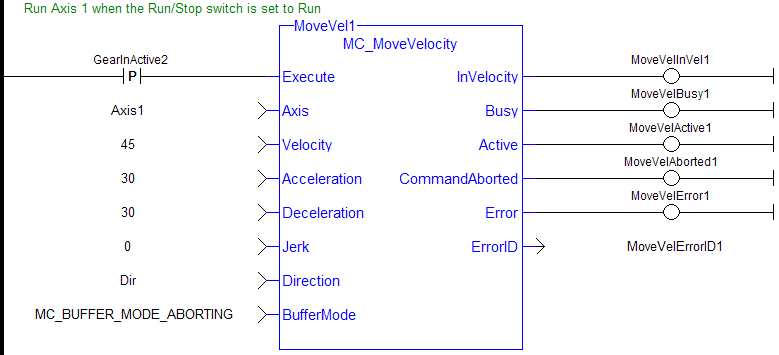
Ladder Diagram
 [Top]
[Top]


