Variables
All variables within the entire system project are grouped as follows:
| Variable | Description |
| Global variables | List all global variables that are used and accessible throughout the entire program |
| Retain Variables | List all variables that are to be retained when the system is powered down |
| Program variables | List the variables related to your specific selected program |
For each variable, the Dictionary toolbox allows you to set the following parameters:
| Field | Description |
| Name | The variable name |
| Value |
All the variables in the Dictionary are animated with real-time values 1 Note that this column is only displayed when your application is running For more details, see "Variable Monitoring" |
| Type | The variable type (which can also be UDFB "User Defined Function Block"
UDFB can be used as a sub-function block in another program of the application. It is described using FBD, LD, ST or IL language. Input / output parameters of a UDFB (as well as private variables) are declared in the variable editor as local variables of the UDFB or complex structure) "User Defined Function Block"
UDFB can be used as a sub-function block in another program of the application. It is described using FBD, LD, ST or IL language. Input / output parameters of a UDFB (as well as private variables) are declared in the variable editor as local variables of the UDFB or complex structure) |
| Dim. | To declare an array, you can specify dimension(s) for an internal variable |
| Attrib. |
The variable attributes (Read Only, External, IN, OUT) as defined:
|
| Init value | The variable initial value when you start your application (see more details here) |
| User Group | The variable user group (used for sorting variables) |
| HMI"Human-machine interfaces "
Also known as computer-human interfaces (CHI), and formerly known as man-machine interfaces, they are usually employed to communicate with PLCs and other computers, such as entering and monitoring temperatures or pressures for further automated control or emergency response
|
Select variables to be used in HMI (see Map Variables to HMI) |
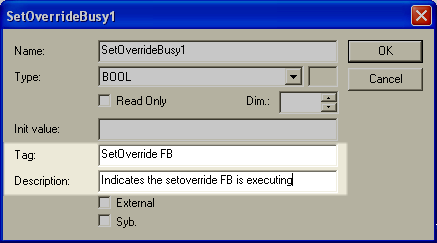
| Tag |
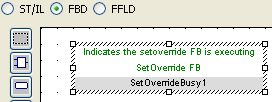
The variable tag is a short comment, that can be displayed together with the variable name in graphical editors. See example here
Edit the variable parameters
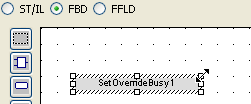
Add the variable to your FBD
Resize the rectangle to make the Tag and Description visible
|
| Description | The variable description is a long comment text that describes the variable |
| Syb. | reserved |