Update Kollmorgen Servo Drives Firmware
This procedure is for the Kollmorgen AKD Series Servo Drives and Kollmorgen Essentials™ Servo Drive.
|
Product |
Firmware Download Link |
|---|---|
|
AKD |
|
|
AKD PDMM |
|
|
AKD2G |
|
|
Kollmorgen Essentials Drive (KED) |
-
-
This procedure cannnot be used when applications are running and when the drive is in Online Configuration Mode.
Procedure
- Scan the devices to verify all devices are created.
- Compile the project.
- Connect to the controller.
- Download the project to the controller.
- Open the EtherCAT Devices summary form.
- Select the drives requiring the same firmware version to be updated.
- Multiple drives of the same type can be selected.
The firmware download is limited to 16 drives at a time.
- AKD-C: Devices with the product description AKD-C String 2 do not support firmware download.
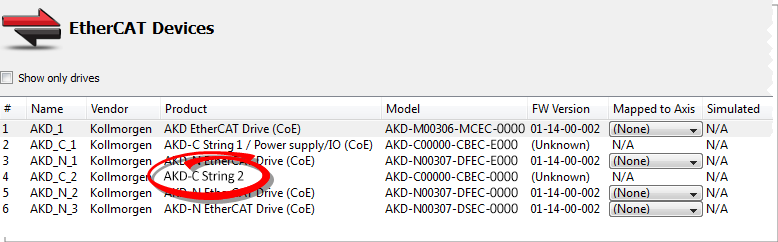
- AKD-N: The last four characters can be different.
However, the firmware file selected to download must support all the selected models.
The fileAKD-N-xxEC-********.i00supports multiple AKD-N models. - AKD-P: The last four letters of the model number must be the same for simultaneous firmware download.
- The firmware download is limited to 16 drives at a time.
- Click the Upgrade Firmware button.
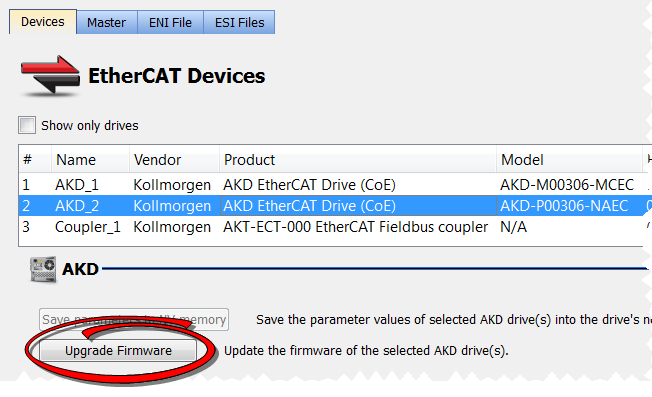
Warning dialogs may appear at this point.
These warnings include important information about preventing damage to the drives.
- Browse to the new firmware file.
See the Release Notes for the latest supported firmware. - Click Open to start the updating procedure.
This procedure cannnot be used when applications are running and when the drive is in Online Configuration Mode.
During the firmware download, the Firmware Update window displays a progress bar and these messages appear:
- Uploading firmware to the drive.
- During the download process, the drive LED displays [dL].
- Additional codes may appear during the download.
- See these Display Codes for a code descriptions related to the firmware download:
- Resetting the drive.
- Firmware update is complete.
-
-
While the firmware is downloading to your drive, do not remove the 24VDC logic power.
If you remove the 24VDC logic power during a firmware download, a severe drive crash can occur.
If a crash occurs, the drive will restart in a special mode and prompt you to reload the firmware.
-
-
An AKD drive executing the resident firmware is detected as a different device than an AKD or AKD2G drive executing the operational firmware.
Re-scan the network and compile it if a drive's executed firmware has changed since the last scan.
KAS uses the File Access over EtherCAT (FoE) protocol.
-
-
Power cycling is recommended after completing the update for all drives.


