LogFileCSV

 Function Block - Create a log file in CSV format for a list of variables.
Inputs
|
Input |
Data Type |
Range |
Unit |
Default |
Description |
|---|---|---|---|---|---|
|
LOG |
BOOL |
FALSE, TRUE |
N/A |
No default |
Variables are saved on any rising edge of this input. |
|
RST |
BOOL |
FALSE, TRUE |
N/A |
No default |
Reset the contents of the CSV file. |
|
LIST |
DINT |
No range |
N/A |
No default |
ID of the list of variables to log (use VLID function). |
|
PATH |
STRING |
1 to 255 |
N/A |
No default |
Path name of the CSV file.
|
Outputs
|
Output |
Data Type |
Range |
Unit |
Description |
|---|---|---|---|---|
|
Q |
BOOL |
FALSE, TRUE |
N/A |
TRUE if the requested operation has been performed without error. |
|
ERR |
DINT |
No range |
N/A |
Error report for the last requested operation. 0 (zero) is OK. |
Remarks
-
-
Calling this function can lead to missing several PLC cycles.
Files are opened and closed directly by the target's Operating System.
Opening some files may be dangerous for system safety and integrity.
The number of open files may be limited by the target system.
Notes
- By default, the LogFileCsv block uses:
- Semicolons ( ; ) as field separators.
- Dots ( . ) as decimal points.
- The SetCsvOpt function to modify these characters to suit specific formatting requirements.
- Opening a file may be unsuccessful (e.g., invalid path or file name, too many open files, etc.)
Your application has to process such error cases in a safe way. - Valid paths for storing files depend on the controller and the type of file storage media being used.
See: - This function enables to log values of a list of variables in a CSV file.
- On each rising edge of the LOG input, one more line of values is added to the file.
- There is one column for each variable, as they are defined in the list.
- The list of variables is prepared using a text editor.
- Use the VLID function to get the identifier of the list.
- On a rising edge of the RST command, the file is emptied.
- When a LOG or RST command is requested, the Q output is set to TRUE if successful.
- In case of error, a report is given in the ERR output.
- Possible error values are:
- 1 = Cannot reset file on a RST command.
- 2 = Cannot open file for data storing on a LOG command.
- 3 = Embedded lists are not supported by the runtime.
- 4 = Invalid list ID.
- 5 = Error while writing to file.
- Possible error values are:
- Combined with real time clock management functions, this block provides a very easy way to generate a periodical log file.
Figure 1 ( ) shows a list and a program that log values every day at 14h23m (2:23 pm).
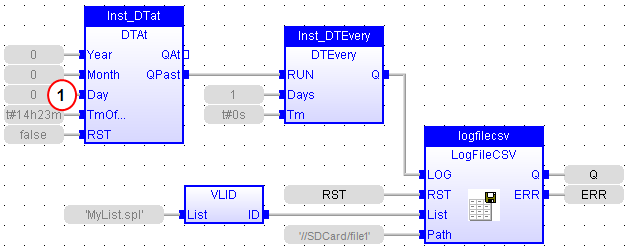
FBD Language Example
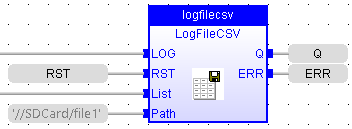
FFLD Language Example
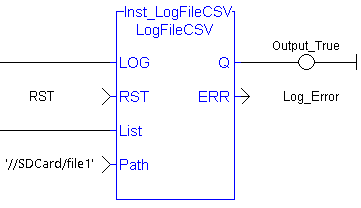
IL Language Example
Not available.
ST Language Example
(* MyLOG is a declared instance of LogFileCSV function block *)
MyLOG (b_LOG, RST, LIST, PATH);
Q := MyLOG.Q;
ERR := MyLog.ERR;
See Also


