Axis Data Parameters

In the PLCopen Axis Data dialog (Figure 1):

  • If a Servo/Stepper axis is selected, two tabs are available:
    • Axis Data
    • Axis Limits
  • If a Digitizing axis is selected, only the Axis Data tab is available.
  • By default, new axes are defined using degrees as the measurement unit.
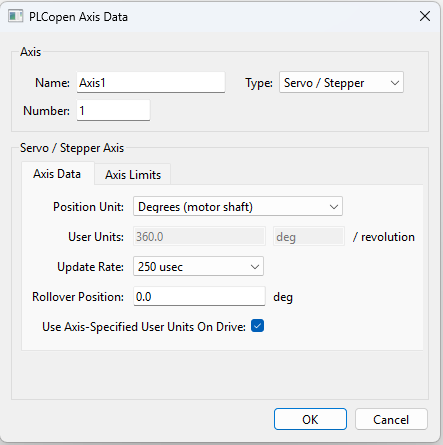
Figure 1: Servo/Stepper Axis - Axis Data tab

The Servo/Stepper Axis - Axis Data parameters are:

Parameter

Description

Position Unit

  • This field sets the units used by the drive axis.
    • When the axis is defined as an AKD2G the controller applies the user units value and label to the drive.
    • These user units are applied for both Op-mode (running application) and Pre-Op mode (online config) when the EtherCAT network is started up.
      • Counts 16-bit
      • Degree
      • Radian
      • Custom - Selecting Custom allows you to specify the User Units value.

User Units / Revolution

  • The value used to define an axis position or distance for an axis.
  • The default values are:
    • Counts: 65,536 / revolution
    • Radian: 6.28318530717 (or 2π) / revolution
    • Degree: 360 / revolution
  • When the Unit is set to Custom you may enter your own value and units name, such as gradians, centimeters, or inches.

Update Rate

The rate at which the axis's feedback is read and a new command position is generated.

The choices are:

  • 250 µsec
  • 500 µsec
  • 1 msec
  • 2 msec
  • 4 msec
  • 8 msec

This rate can be slower or equal to the EtherCAT Cycle Time.

  • The EtherCAT Cycle Time specifies the rate at which data is transferred between the control and the drives.
    • The axis Update Rate is the rate at which the PLCopenCode reads the feedback, runs its interpolation, and generates a new command position.
    • By allowing some axes to run at a slower rate and staggering the updates on which these axes are interpolated, more axes and/or quicker execution times can be achieved since every axis does not have to be interpolated every update.
  • If you select an axis Update Rate which is faster than the EtherCAT Cycle Time, the axis is set to run at the EtherCAT Cycle Time.
  • See EtherCAT Master Settings tab.

Rollover Position

  • The value at which the axis position rollovers to zero. Rollover Position is specified in User Units.

Example

  • If the rollover position is 100:
    • The axis position counts up from 0 to 999 and then rollover back to 0.
    • In the reverse direction, the axis position counts down to 0 and then rollover to 999.
  • If Rollover Position is 0, no rollover occurs.
    • Axis positions become negative values when counting down below 0.

Use Axis-specified User Units on Drive

  • When this check box is selected, and if the Axis is mapped to a AKD2G or a Kollmorgen Essentials Drive, the KAS compiler automatically generates the required CoE Init commands to set the drive User Units same as the Pipe Network Axis.
  • By default, the check box is selected.