PLC Variable Creation Wizard
The wizard is used to automatically create a list of variables used for the mapping. (Figure 1)
The variable type is Boolean for digital I/Os and UINT for analog I/Os.
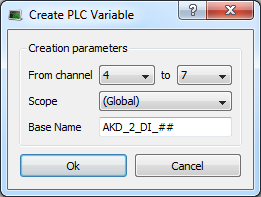
Figure 1: Wizard to Create PLC Variable - Parameters
|
Field |
Description |
|---|---|
|
From channel |
Defines the range of channels you want to map automatically. (Figure 2) |
|
Scope |
Defines where the variables are created. If you select the Global scope, the variables are created under the Global node in the Dictionary. (Figure 3) |
|
Base Name |
Pattern used for variable naming with the name of the object in the Project Tree, followed by a 2-letter acronym (2LA) representing the I/O type. The channel number replaces ##. |
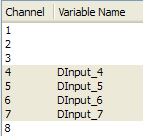
Figure 2: Wizard to Create PLC Variable - Mapped Channels

Figure 3: Wizard to Create PLC Variable - Variables in the Dictionary


