Run the Project
This section explains how to build, download, and run your project.
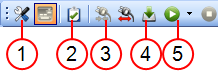
The Steps in this table correspond to Figure 1.
|
Step |
Description |
|---|---|
|
1 |
Set the compilation options to run your project in Debug or Release modes. Choose if you want to activate the Online Changes. |
|
2 |
Compile the application and see all the remaining warnings and errors.
|
|
3 |
Connect the KAS-IDE to the target device. |
|
4 |
Download the Application compiled on the KAS-IDE to the target device. |
|
5 |
Start / stop the device, and control your application with the script commands. |


