AKD / AKD2G / Kollmorgen Essentials Drive Backup and Restore Compatibility
The replacement AKD / AKD2G
- All AKD drives must have the same firmware version for the Backup and Restore to work.
- The Restore operation compares the model numbers between the backup and the replacement AKD.
- Restore is not allowed if they are not compatible.
-
- The AKD-Pxxxxx-NB and AKD-Pxxxxx-NC models are functionally compatible with, and may be replaced with, AKD-Pxxxxx-ND devices provided the backup contains AKD firmware version v01-22-00-000 and later.
|
|
|
Restore |
||||
|
|
|
AKD-NB |
AKD-NC |
AKD-ND |
AKD2G |
Kollmorgen Essentials Drive |
|
Backup |
AKD-NB |
|
|
|
|
|
|
AKD-NC |
|
|
|
|
|
|
|
AKD-ND |
|
|
|
|
|
|
|
AKD2G |
|
|
|
|
|
|
|
Kollmorgen Essentials Drive |
|
|
|
|
|
|


Model Number Verification
See the sticker on the side of the drive to check the model number on your AKD / AKD2G
Compatibility
To check compatibility between your replacement drive and the backup:
- Replace the AKD / AKD2G
- Press the Scan network button.
-
The Web server displays the physical topology.
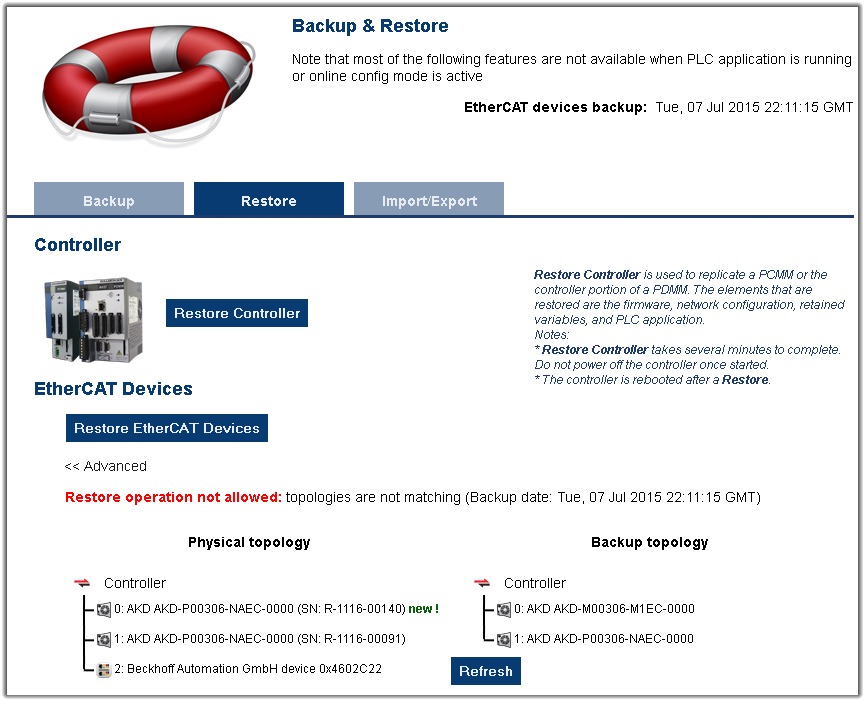
Use this to restore the selected drives if the backup and replacement drives are compatible. (Figure 1) - The Web server displays the backup and physical topology and indicates the non-compatible drives if the backup and replacement drive are not compatible. (Figure 2)
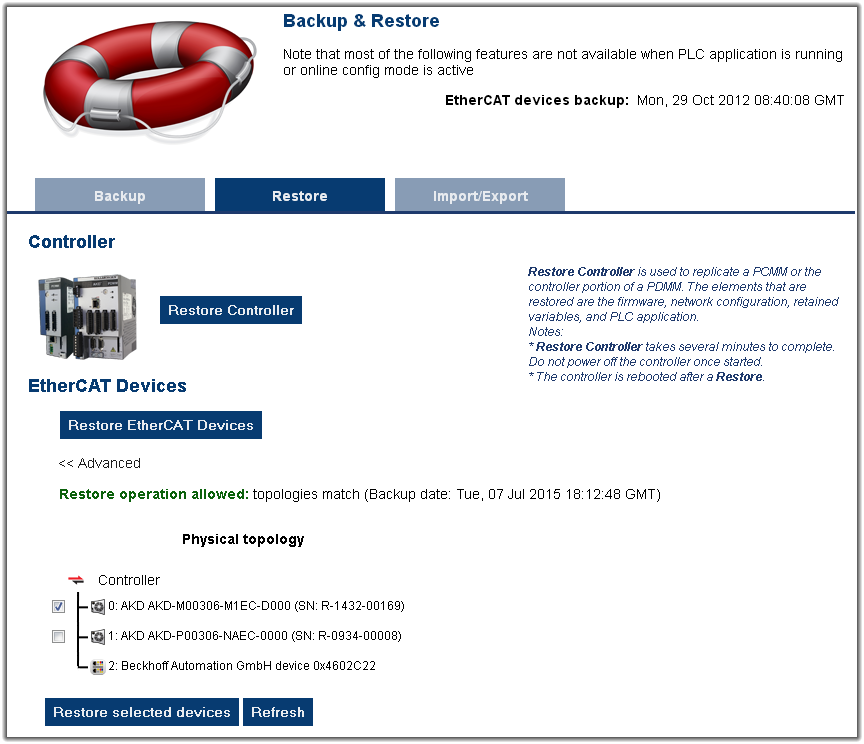
Figure 1: Web server Topology - Compatible
-
The Web server displays the physical topology.
-
-
The serial number (SN) is displayed in the Physical topology Web server view and on the sticker affixed to the AKD / AKD2G
Use the serial number to match the actual hardware with its representation on the Web server.


