FBD Variables
- Click this button in the FBD toolbar to insert a variable tag:

- In this mode, the mouse is used for inserting variable tags.
- Click in the diagram and drag the new variable to the desired position.
- Double-click a variable tag to open the variable selection box.
See Select FBD Variables and Instances. - Either select the symbol of a variable or enter a constant expression.
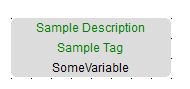
Variables tags must be linked to other objects (e.g., block inputs and outputs) using connection lines. - Resize a variable box vertically to display, together with the variable name, its tag (short comment text), and its description text.
The variable name always appears at the bottom of the rectangle:
|
|
Description Tag Name |
See Variables tab.


