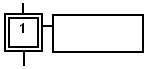
SFC Steps
- It is drawn as a square box in the SFC chart.
- Each step of a program is identified with a unique number.
- At runtime, a step can be either active or inactive according to the state of the program.
-
-
Select a step, transition, or jump and press Ctrl+ENTER to change its number.
All actions linked to the steps are executed according to the activity of the step.
|
Inactive Step |
Active Step |
|---|---|
|
|
|
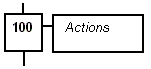
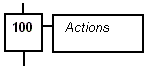
In conditions and actions of the SFC program, you can test the step activity by specifying its name (i.e., GS then the step number followed by .X).
Example
GS100.X |
|
You can test the activity time of a step, by specifying the step name followed by .T.
- It is the time elapsed since the activation of the step.
- When the step is deactivated, this time remains unchanged.
- It is reset to 0 (zero) on the next step activation.
Example
|
GS100.T |
Is the time elapsed since step 100 was activated. Expression has the TIME data type. |
Initial Steps
Initial steps represent the initial situation of the chart when the program is started.
- There must be at least one initial step in each SFC chart.
- An initial step is marked with a double line: