MLFB_HomeFindLimitFastInput

 Function Block - Fast homing to a limit switch.
- Performs a single-axis home to a limit switch connected to a High Speed Input.
- The motor starts to move according to the direction setting.
- The home position has been found as soon as the fast input selected is triggered on the edge selected.
- An absolute move is made to the triggered position and the position value is set.
Usage
- This procedure performs a homing function searching for a sensor using only High Speed Input Switches.
- A High Speed Limit Switch has 1 Off (or On) area.
- Home is commanded by the user in the designated homing direction at the selected or programmed Velocity.
- The Timeout can cause an error if exceeded.
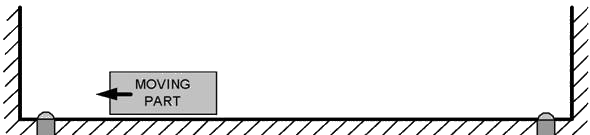
Figure 1: MLFB_HomeFindLimitFastInput Usage 1
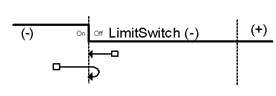
Figure 2: MLFB_HomeFindLimitFastInput Usage 2
Inputs
|
Input |
Data Type See Data Types. |
Range |
Unit |
Default |
Description |
|---|---|---|---|---|---|
|
ibExecute |
BOOL |
0 to 1 |
N/A |
No default |
Request the homing step procedure at the rising edge. |
|
iAxisID |
AXIS_REF |
1 to 256 |
N/A |
No default |
Name of a declared instance of the AXIS_REF library function. See AXIS_REF Structure. |
|
iPosition |
LREAL |
No range |
User units |
No default |
Offset position applied after home switch is found. |
|
ibDirection |
BOOL |
0 to 1 |
N/A |
No default |
Defines the axis homing direction.
|
|
iVelocity |
LREAL |
No range |
User units / sec |
No default |
Commanded velocity for the homing move. |
|
iAcceleration |
LREAL |
No range |
User units / sec2 |
No default |
Commanded acceleration for the homing move. |
|
iDeceleration |
LREAL |
No range |
User units / sec2 |
No default |
Commanded deceleration for the homing move. |
|
ibLimitSwitchMode |
BOOL |
0 to 1 |
N/A |
No default |
Limit switch state to complete homing.
|
|
ibFastInputNumber |
BOOL |
0 to 1 |
N/A |
No default |
Limit switch state to complete homing.
|
|
iCycleTime |
LREAL |
No range |
Microseconds |
No default |
EtherCAT cycle time. Either 250, 500, or 1000. |
Outputs
|
Output |
Data Type See Data Types. |
Range |
Unit |
Description |
||||||||||||
|---|---|---|---|---|---|---|---|---|---|---|---|---|---|---|---|---|
|
obDone |
BOOL |
FALSE, TRUE |
N/A |
Indicates the move completed successfully. |
||||||||||||
|
obActive |
BOOL |
FALSE, TRUE |
N/A |
Indicates this move is the Active move. |
||||||||||||
|
obError |
BOOL |
FALSE, TRUE |
N/A |
Indicates either:
|
||||||||||||
|
oErrorID |
DINT |
|
N/A |
Indicates the error if Error output is TRUE. Error identifier:
|
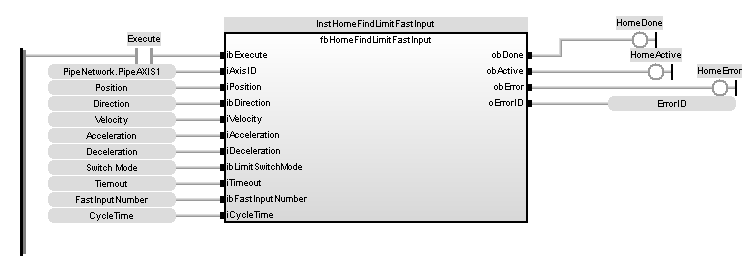
FBD Language Example
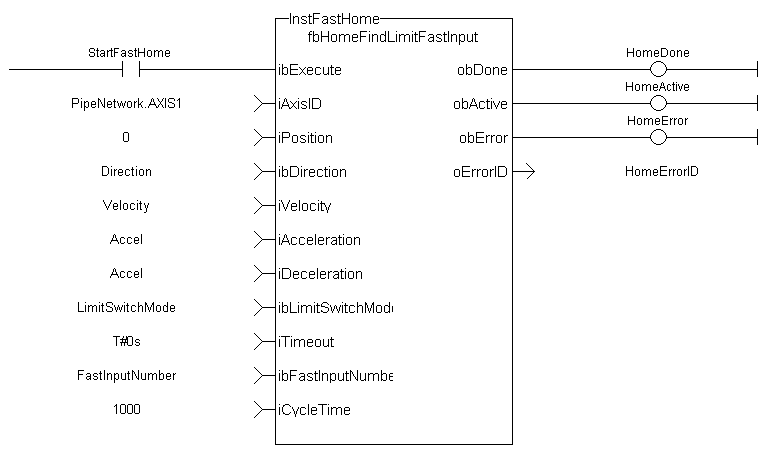
FFLD Language Example
IL Language Example
Not available.
ST Language Example
Direction:= 0;
Position:=1000;
Velocity:=1000;
Acceleration:=10000;
Deceleration:=10000;
SwitchMode:=0;
Timeout:=T#100;
FastInputNumber:=0;
CycleTime:=1000;

inst_fbHomeFindLimitFastInput(True, Axis1, Position, Direction, Velocity, Acceleration, Deceleration, LimitSwitchMode, Timeout, FastInputNumber, CycleTime);

HomeComplete :=inst_fbHomeFindLimitFastInput.Done;
HomeActive :=inst_fbHomeFindLimitFastInput.Active;
HomeError :=inst_fbHomeFindLimitFastInput.Error;
HomeErrorID :=inst_fbHomeFindLimitFastInput.ErrorID;
See Also


