Action Blocks (POU)
Action Blocks are a structuring feature that allows automation logic to be segmented into named, reusable units that can be called by programs, steps, or execution logic.
Action Blocks help structure automation logic by separating what is done from when it is done.
They are designed to:
- Improve readability of large IEC 61131-3 projects.
- Reduce code duplication.
- Make applications easier to maintain, debug, and scale.
-
-
Action Blocks are especially useful when developing complex sequences, state based logic, or modular machine behaviors.
See:
Concept and Purpose
An Action Block represents a logical operation or behavior (e.g., StartMotor, CheckSafety, HandleFault).
Instead of embedding large logic sections directly inside programs or SFC steps, these operations are encapsulated and referenced as needed.
Key characteristics are:
- Executed on demand, not automatically cyclic.
- It can be organized independently from program structure.
- No internal instance memory.
- Works with the variables of its parent POU.
- Ideal for actions, procedures, or conditional tasks.
- Complements IEC 61131-3 languages rather than replacing them.
This abstraction layer helps structure automation projects without changing the execution model of the PLC runtime.
Supported Environments
Action Blocks are available in the KAS-IDE and are compatible with standard IEC 61131-3 workflows:
- Programming languages include:
They are executed by the KAS runtime without any additional scheduling mechanisms.
Action Block Ownership and Scope
Each Action Block is owned by a parent POU (typically a Program).
- This ownership defines the block’s visibility and how it must be referenced when invoked.
- Conceptually, an Action Block is uniquely identified by: ActionBlockName + ParentPOUName.
Creating an Action Block
- Open a project in KAS-IDE.
- In the Project Explorer > Programs section, right-click a program.
- Select Add Action Block and choose a language (e.g., FBD, FFLD, IL, or ST). (Figure 1)
- In the text box, enter a unique name for the action block. (Figure 2)
- Click OK to save the changes or selections and close the dialog box.
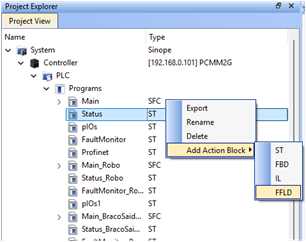
Figure 1: Example: Project Explorer > Project View > Programs > Status > Add Action Block
The New Program dialog box opens.
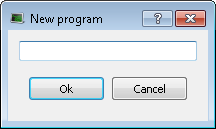
Figure 2: New Program dialog box
-
-
- Naming Guidelines
- Use verb-based names (e.g., StartPump, ResetAlarm).
- Avoid generic names (e.g., Action1, Program 1).
- Match the naming conventions used for programs and function blocks.
- Naming Guidelines
The Action Block editor opens automatically, allowing you to implement the logic
Implementing Logic Inside an Action Block
An Action Block contains standard IEC 61131-3 logic, identical in syntax and behavior to program level code.
Example (Structured Text)
IF CmdStart AND SafetyOK THEN
    MotorRun := TRUE;
END_IF;
Important Notes
- Action Blocks share local variables of its parent POU and has no separate private variables.
- Action Blocks can access:
- Global variables
- Functions
- Function blocks
- UDFBs
- They do not define tasks or execution cycles themselves.
- Execution depends entirely on where and how they are called.
Using Action Blocks
Action Blocks never execute automatically.
- They must be called explicitly from a program.
- Invocation of Action Blocks is supported only from Structured Text (ST) programs and Sequential Function Chart (SFC) step actions.
- The required syntax to invoke action block depends on scope.
Unqualified Invocation
ActionBlockName();
Valid When
- The Action Block is defined in the same parent POU as the calling code.
Example Structure
Programs
9 MotorControl
9 Action Block: StartMotor
9 ActionBlock: JogMotor
Example Usage
Program MotorControl
IF CmdStart THEN
    StartMotor();
END_IF;
This form is concise and recommended for local Action Blocks.
Qualified Invocation (Fully Qualified Name)
ActionBlockName@ParentPOUName();
Required When
- The Action Block is defined in a different POU.
- Multiple Action Blocks share the same name.
- Explicit scoping is desired for clarity or safety.
Example Structure
Programs
9 MotorControl
9 Action Block: StartMotor
9 Main (ST logic)
Invocation from Main
IF CmdStart THEN
    StartMotor@MotorControl();
END_IF;
Attempting to call StartMotor(); in this context results in a compiler error.
Name Disambiguation Example
When multiple POUs define Action Blocks with the same name:
Program PumpControl > Action Block: Start
Program MotorControl > Action Block: Start
Correct Usage:
Start@PumpControl();
Start@MotorControl();
-
-
- As a best practice, a qualified invocation approach is preferred in large or safety-critical procedures.
- Use Action blocks for actions and procedures, not state management.
Debugging and Maintenance
Online Monitoring
- Action Blocks support online monitoring.
- Variable values update in real time.
- Execution flow remains traceable through calling logic.
Maintenance Benefits
- Changes to shared logic require editing only one Action Block.
- Reduces regression risk.
- Improves long term project maintainability.
Action Blocks are especially helpful in multi program or multi machine projects where behavior must remain consistent.
Action Blocks have an Unexpected Variable Selector Prompt in FFLD Editors
Issue:
- Drag-and-drop of an child Action Block from the Library into a parent FFLD editor may cause the Variable Selector dialog box to open as if the Action were a Function Block. (Figure 3)
- This issue does not occur when either:
- Other editors (e.g., FBD or ST) are used.
- The Action Block is not the child of the FFLD program.
- This issue does not occur when either:
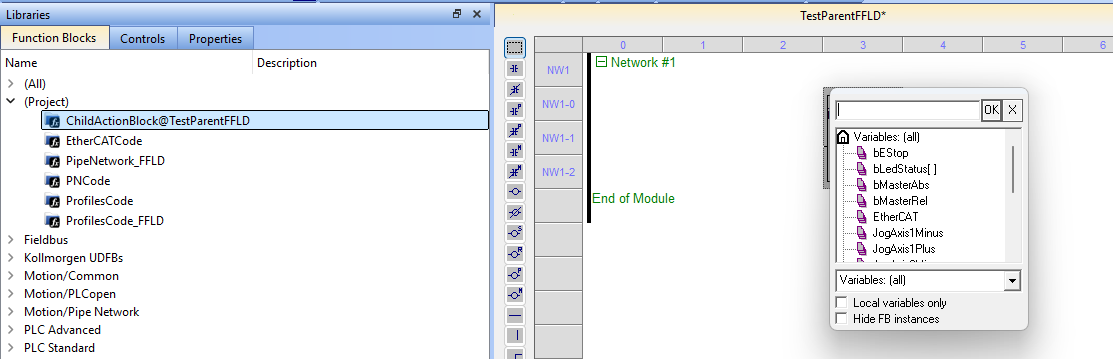
Workaround:
- On the keyboard, press <Esc> to close the dialog box and continue editing.
- The Child Action Block now appears correctly in the editor.


