Copy Retained Variable Values to Init Value
Once a retained variable’s runtime value has been validated, it can be copied into its Init Value.
The Copy Retained Variable Runtime Values to Init Values feature ensures that runtime validated values are preserved inside the project itself, not only in controller memory.
This provides several benefits:
- Protects against retained data loss due to project changes.
- Captures commissioning, tuning, or calibration results.
- Makes the application deterministic across deployments.
- Enables deploying the application to new or replacement machines.
- Eliminates manual reentry of tuned values.
Preconditions
Before using this procedure, verify:
- KAS-IDE is connected to the controller.
- The application is in a valid runtime state.
- The compiled project version in KAS-IDE matches the version running in KAS Runtime.
Procedure
- Open the KAS project in KAS-IDE.
- Connect to the controller.
- Compile and Download the project, if necessary.
- Start the project, if not running already.
- Wait until the system reaches a stable operational state.
- Navigate to the Variables tab in the KAS-IDE.
- Right-click on the Retain Variables entry and select Copy variable value to init value. (Figure 1)
-
-
This option is also available for individual variables in the Retain Variables section.
- Confirm the operation when prompted.
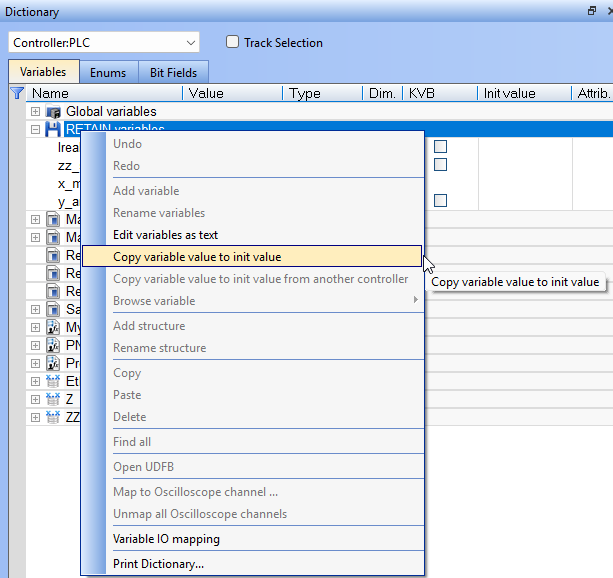
Figure 1: Copy variable value to init value
After Completion
The current runtime value of each retained variable is written to its Init Value in the project configuration.
- Save the project to avoid losing changes.
- Compile and download the updated project to the controller if you want the new init values to take effect.
Example Procedure
This example determines a retain variable's value and saves the value to the retain variable's initial value.
- Run the program to determine the retain variable's value, which is FALSE. (Figure 2)
- Right-click the variable and select Copy variable value to init value. (Figure 3)
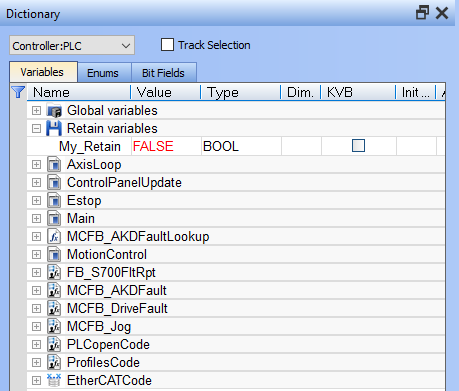
Figure 2: Example: Retain Variable = FALSE
Figure 3: Right-click, select Copy variable value to init value
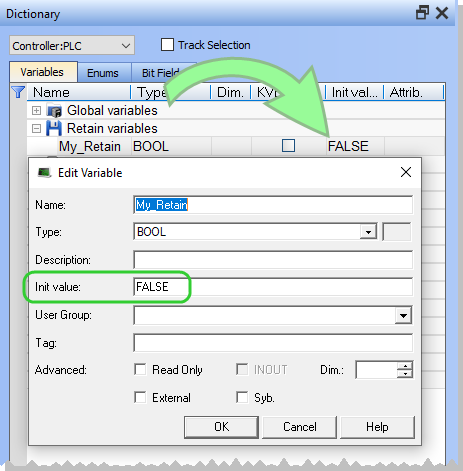
The Init value field is now FALSE. (Figure 4)