








CIP_Axis_Disable AOI
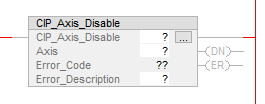
The CIP_Axis_Disable instruction requests to disable the AKD2G-SPI axis via the CIP_Axis_State_Machine AOI.
Compatibility
The CIP_Axis_Disable AOI is only compatible with AKD2G-SPI drives when used with Motion Supported PLCs with Studio 5000 and the CIP Sync connection.
Required Command Source and Operation Mode
- AXIS#.CMDSOURCE = Fieldbus
- AXIS#.OPMODE = Position
The CIP_Axis_Disable AOI passes a RequestedAction of 1 to the corresponding CIP_Axis_State_Machine AOI for the given axis. When the axis status bit Operation Enabled is False then the CIP_Axis_Disable command is successful and the .DN bit is set. If the axis status bit Operation Enabled does not transition to False in a timely manner then a command timeout for the CIP_Axis_Disable AOI is declared and its .ER bit is set.
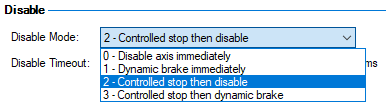
When the CIP_Axis_Disable AOI requests the axis to disable it uses the AXIS#.DISMODE as set in WorkBench on the Axis1 or Axis2 Enable/Disable screen.
The CIP_Axis_Disable AOI execution time may require multiple scans (additional 300-350 ms) due to the required fieldbus communication time and time for the drive’s axis output and servo loop to be deactivated.
Operands
These entries are required by the user.
|
Operand |
Data Type |
Format |
Description |
|---|---|---|---|
|
CIP_Axis_Disable |
CIP_Axis_Disable |
Tag |
Tag name for instance of the AOI. |
|
Axis |
CIP_Axis |
Tag |
User tag defined in the Axis1 or Axis2 field of the CIP_Drive_Comms AOI. |
|
Error_Description |
STRING |
Tag |
User tag to display the string error code description. In run-time when the mouse cursor is hovered over the tag the string can be monitored.
|
Structure
These fields are not entered by the user and are populated automatically with Read Only data once the Operands (in the Operand table for this AOI) are entered or presented as output data (bits).
|
Mnemonic |
Type |
Format |
Description |
|---|---|---|---|
|
.EnableIn |
Input |
BOOL |
The Enable Input bit indicates the instruction is enabled. |
|
.EnableOut |
Output |
BOOL |
The Enable Output bit is the output of the Enable Input (.EnableIn) bit. |
|
.DN |
Output |
BOOL |
Turns ON when the disabled response is returned (disable state acknowledged). Set when the Axis.Status.Operation.Enabled bit turns False (Disable succeeded). |
|
.ER |
Output |
BOOL |
The ER bit is set if Operation Enabled (status bit 2 in the Status Word) is not confirmed OFF in the time set by the Command Timeout preset. Set if the Axis.Status.Operation_Enabled bit is not confirmed OFF. |
|
Error_Code |
Output |
SINT |
|
Changes to Axis Status Bits and Control Word bits Description
- All status bits are updated from the drive.
- See Status Word in CIP Sync Response Assembly Data Structure (106).
- Control Word bits descriptions and functions are described under Control Word in CIP Sync Command Assembly Data Structure (105).
- See CIP Sync: State Machine.
On Enable the axis enters the Switch On Disabled state and the status bits are:
|
Bit |
Name |
Status |
|---|---|---|
|
0 |
Ready To Switch On |
OFF |
|
1 |
Switched On |
OFF |
|
2 |
Operation Enabled |
OFF |
|
6 |
Switch On Disabled |
ON |
See the sections "States of the state machine" and "Mode-dependent bites in the statusword" in CIP Sync: State Machine for more information.
Example of Usage/Programming Guidelines
In the Sample project the CIP_Axis_Disable AOI is used in the subroutine for the given axis under MainTask → MainProgram → Axis1_Routine or Axis2_Routine.
Subroutines are called in the MainRoutine_with_CIP_State_Machines routine under MainTask → Main Program.

The best practice for the CIP_Axis_Disable AOI is to use a conditional N.O. Contact as a trigger (Ax1_Disable_Toggle in the example below) and then use a One Shot (ONS) to trigger CIP_Axis_Disable AOI .EnableIn.
A parallel branch is implemented around the N.O. Contact and One Shot to seal-in the .EnableIn of the AOI until execution completes (.DN; Done) or fails (.ER; Error).
An additional rung provides a way to monitor the enable state in the ladder based on the AXIS_ONE.Status.Operation_Enabled status bit in the axis status word and when it is False (OFF) a coil in the ladder named Axis1_Disabled turns ON.
AXIS_ONE is the name given to Axis1 in the CIP_Drive_Comms in the Sample project as an alias for all other Kollmorgen CIP_Axis AOIs to use for that axis.
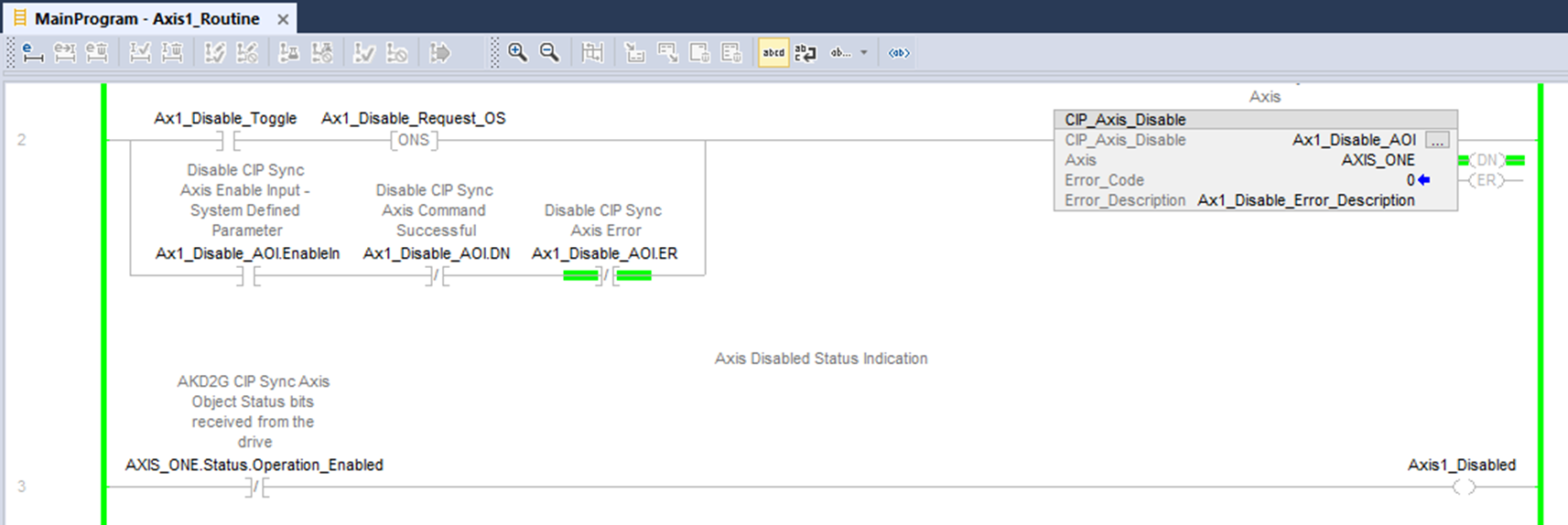
Figure 1: Example: Axis1_Routine with CIP_Axis_Disable AOI
Troubleshooting
The condition for the Error (.ER) bit to be set for the CIP_Axis_Disable AOI:
If the Axis.Status_Operation_Enabled bit does not turn OFF in 2000 msec then declare a command timeout error.
Step Summary
|
Step Number |
Operation/Result |
|---|---|
|
0 |
Clear bits and error codes |
|
1 |
Set the Axis.RequestedAction to 1 (Disable) |
|
2 |
Monitor Axis.Status_Operation_Enabled to determine success (DN) or command timeout (ER) |
|
-1 |
Error (Command Timeout) |
Revision History
| Revision Number | Description/Notes | Date of Revision |
|---|---|---|
| v1.5 | Initial release | 03-14-2024 |


