








Profile Torque Mode
| Axis | Object | Value |
|---|---|---|
| Axis 1 | 6060h 6060h, 6860h Modes of operation - AxisX | 4 |
| Axis 2 | 6068h 6060h, 6860h Modes of operation - AxisX | 4 |
- Industrial Ethernet
- ProfileTorque Mode is supported by the following Industrial Ethernet protocols:
- CAN bus/CANopen
- EtherCAT/CANopen over EtherCAT (CoE)
Description
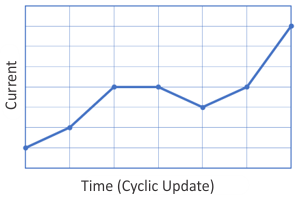
Profile Torque Mode is a CANopen (DS402) mode of operation used for real-time torque (current) control. The CANopen objects define the settings for this move. With this mode, the torque command is sent from the master to the current loop in the slave drive. The drive operates in torque mode. The drive commands the specified current to the motor.
Drive Opmode and Command Source
The AKD2G opmode and command source are automatically configured when the Modes of operation is set through objects 6060h, 6860h Modes of operation - AxisX.
| Drive Command | Value |
|---|---|
| AXIS#.OPMODE | 0 - Torque |
| AXIS#.CMDSOURCE | 1 - Fieldbus |
Motion Settings:
- Target Torque
- Maximum Torque
- Torque Slope
- Scaling
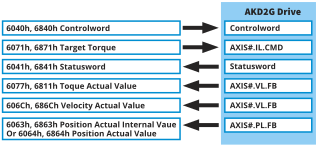
Common PDO Data
| Index | Sub-index | Object Name | Drive Command | Data Type | Access |
|---|---|---|---|---|---|
| 6071h, 6871h Target torque - AxisX | 0h | Target torque | AXIS#.IL.CMD | Signed32 | Read/Write |
| 6072h, 6872h Max torque - AxisX | 0h | Max torque | AXIS#.IL.LIMITP/ AXIS#.IL.LIMITN | Signed32 | Read/Write |
| 6087h, 6887h Torque slope - AxisX | 0h | Torque slope | AXIS#.IL.RATELIMITU | Unsigned32 | Read/Write |
| 6040h, 6840h Controlword - AxisX | 0h | Controlword | AXIS#.CANOPEN.CONTROLWORD | Unsigned16 | Read/Write |
| Index | Sub-index | Object Name | Drive Command | Data Type | Access |
|---|---|---|---|---|---|
| 6041h, 6841h Statusword - AxisX | 0h | Statusword | AXIS#.CANOPEN.STATUSWORD | Unsigned16 | Read Only |
| 6077h, 6877h Torque actual value - AxisX | 0h | Torque actual value | AXIS#.IL.FB | Signed32 | Read Only |
| 6063h, 6863h Position actual internal value - AxisX | 0h | Position actual internal value | AXIS#.PL.FB | Signed32 | Read Only |
| 6064h, 6864h Position actual value - AxisX | 0h | Position actual value | AXIS#.PL.FB | Signed32 | Read Only |
| 606Ch, 686Ch Velocity actual value - AxisX | 0h | Velocity actual value | AXIS#.VL.FB | Signed32 | Read Only |
| 605Ah, 685Ah Quick stop option code - AxisX | 0h | Quick stop option code | N/A | Signed16 | Read/Write |
| 5000h, 5100h AXIS#.* | 4h | Axis specific objects | AXIS#.MOTIONSTAT | Unsigned32 | Read Only |
Alternate Objects
- Target Torque (mA)
- The target torque can be specified using 5003h, 5103h sub index 5 as an alternative to the DS402 parameter 6071h, 6871h as the input to the torque controller in profile torque mode. It allows the command to be specified in mA instead of percent rated torque.
The current (torque) feedback can also be monitored using mA as an alternative to the DS402 percent rated torque objects 6077h, 6877h Torque actual value - AxisX in Profile Torque mode.
Motion Functionality
Profile Torque Mode follows the CANopen (DS402) State Machine. The drive must be in Operation enable state to act on the target torque command.
The Controlword is used to control the state machine and command motion. See objects 6040h, 6840h Controlword - AxisX and 6041h, 6841h Statusword - AxisX.
| Controlword Bits | Motion Function |
|---|---|
| Bit 2 | Stop motion (Quick stop) |
| Bit 8 | Pause/halt |
Controlword Bit 2 (Quick Stop):
- Does not use object 605Ah, 685Ah Quick stop option code - AxisX
- Commands dynamic braking and disables the drive
- Sets current command = 0 (AXIS#.IL.CMD = 0)
- Does not remember the previous setpoint
- To resume from Quick Stop, step through the state machine until operation enable
| Controlword Bit | Value | Function |
|---|---|---|
| Bit 2 | 0 | Stops motion |
| Bit 2 | 1 | Allows motion |
Controlword Bit 8 (Halt):
- Pauses/halts motion
- Sets current command = 0 (AXIS#.IL.CMD = 0)
- Remembers previous setpoint
- Continues the move using the latest setpoint when bit 8 is turned off
- Deceleration ramp (rate of decrease of current) is set by object 6087h, 6887h Torque slope - AxisX
| Controlword Bit | Value | Function |
|---|---|---|
| Bit 8 | 0 | Allows/resumes motion |
| Bit 8 | 1 | Pauses motion |
Status
The Statusword (6041h, 6841h Statusword - AxisX) can be read for handshaking purposes. It can indicate a fault or warning condition, status of the power stage, home attained, setpoint acknowledged, target position reached, etc.
Mode-Specific Statusword Bits
| Statusword Bits | Status |
|---|---|
| Bit 10 | Target reached |
| Bit 12 | Standstill |
| Statusword Bit | Value | Controlword Bit 8 Value | Function |
|---|---|---|---|
| Bit 10 | 0 | 0 | Target torque not reached |
| 1 | Axis decelerating | ||
| Bit 10 | 1 | 0 | Target torque reached |
| 1 | Velocity = 0 | ||
| Bit 12 | 0 | Motor is moving. | |
| Bit 12 | 1 | Motor is at standstill. |
Example Sequence of Events
| Step | Object Name | Object | Sub-index | User Value |
|---|---|---|---|---|
| Set operation mode | Modes of operation | 6060h, 6860h Modes of operation - AxisX | 0 | 0x04h |
| Set parameters | Max torque | 6072h, 6872h Max torque - AxisX | 0 | User specified |
| Torque slope | 6087h, 6887h Torque slope - AxisX | 0 | User specified | |
| Ready for switch-on | Controlword | 6040h, 6840h Controlword - AxisX | 0 | 0x06h |
| Operation enable | Controlword | 6040h, 6840h Controlword - AxisX | 0 | 0x0Fh |
| Send target torque | Target torque | 6071h, 6871h Target torque - AxisX | 0 | User specified |
| Halt | Controlword | 6040h, 6840h Controlword - AxisX | 0 | 0x10Fh |
| Resume from halt | Controlword | 6040h, 6840h Controlword - AxisX | 0 | 0x0Fh |
| Quick stop | Controlword | 6040h, 6840h Controlword - AxisX | 0 | 0x0Bh |
| Resume from quick stop | Controlword | 6040h, 6840h Controlword - AxisX | 0 | 0x06h->0x0Fh |
| Send target torque | Target torque | 6071h, 6871h Target torque - AxisX | 0 | User specified |
| Send new target torque | Target torque | 6071h, 6871h Target torque - AxisX | 0 | User specified |
Monitor
| Step | Object Name | Object | Sub-index | Value |
|---|---|---|---|---|
| Read status | Statusword bit 12 (motor moving) | 6041h, 6841h Statusword - AxisX | 0 | 0 or 1 |
| Read status | Statusword bit 10 (target reached) | 6041h, 6841h Statusword - AxisX | 0 | 0 or 1 |
| Read torque actual value | Torque actual value | 6077h, 6877h Torque actual value - AxisX | 0 | |
| Read position actual internal value | Position actual internal value | 6063h, 6863h Position actual internal value - AxisX | 0 | |
| Read position actual value | Position actual value | 6064h, 6864h Position actual value - AxisX | 0 |
CANopen Scaling
The motion setpoints and actual values can be scaled using CANopen objects or the associated drive parameters. These include values for position, velocity, acceleration, deceleration and current (torque). See CANopen Scaling.
Scale factors affect the values of the motion setpoint objects and should be set prior to writing/changing the setpoint objects.


